# Two Phase Commit (Actor model/Object oriented)
> Build two-phase commit from scratch with roles and RPCs, then add timeouts and watch plausible fixes fail one by one until one works, with sequence diagrams.
Canonical: https://fizzbee.io/design/examples/two_phase_commit_actors/
# Two Phase Commit (Object oriented/Actor style implementation)
This is another implementation style in FizzBee to model the Two Phase Commit protocol.
There are two other styles,
1. [Functional style](/design/examples/two_phase_commit/) similar to TLA+
2. [Procedural style](/design/examples/two_phase_commit_procedural/) similar to PlusCal
3. Object oriented style (this post) similar to P
The significant benefit of this style is, it would feel more natural to how you think about the design of
the distributed systems.
For more information about Roles, refer to [Roles](/design/tutorials/roles/).
## Quick overview
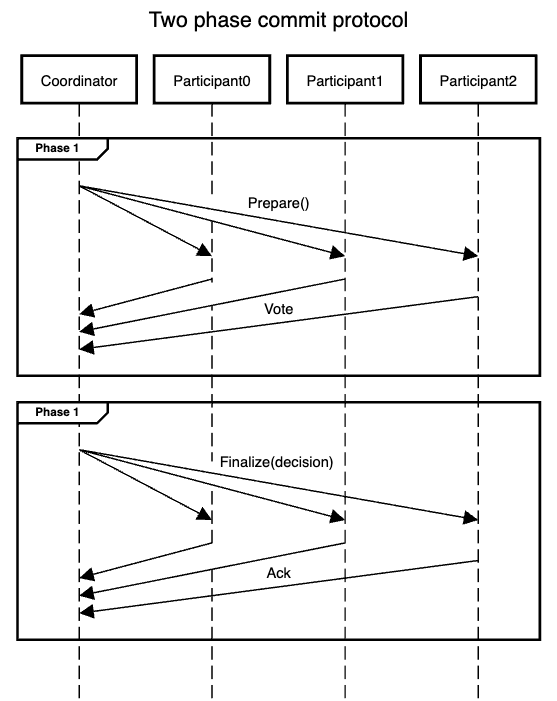
*Rough Design of the Two Phase Commit Protocol*
## Summary of the steps to implement
### Preparation
0. **Start with some rough design diagrams:**
Sketch a rough system design and sequence diagram to clarify roles and interactions as we had done above.
They don’t need to be precise or complete - this reduces cognitive load and helps you focus on the modeling process.
### Modelling
1. **Identify the roles:**
As shown in the sequence diagram, there are two roles - `Coordinator` and `Participant`.
2. **Identify the state for each role:**
Each `Coordinator` and `Participant` has its own `status` variable to track the state of the transaction independently.
3. **Define and initialize the system:**
Create instances of `Coordinator` and `Participant` roles to represent the transaction system.
4. **Identify the RPCs for each role:**
The `Participant` exposes two RPCs - `Prepare` (Phase 1) and `Finalize` (Phase 2).
- **RPCs** are functions called between different roles.
- In this case, `Prepare` and `Finalize` are RPCs because the `Coordinator` calls them on the `Participant`.
5. **Identify the actions for each role:**
- **Actions** are similar to functions but do not specify a caller. They represent external triggers such as user requests, timers, or client API calls.
- The `Coordinator` has an action `Commit`, which starts the two-phase commit protocol.
6. **Implement the RPCs and actions.**
This is the core of the design specification-the pseudo-code part of the spec. The implementation is written in a Python-compatible Starlark-like language, defining the logic for each role.
You can introduce helper functions, enforce preconditions, and model non-determinism where needed.
7. **Identify durable/ephemeral states:**
In this implementation, the `status` variables of both `Coordinator` and `Participant` are durable. Since durability is the default, no additional handling is needed.
### Validation
8 **Identify the safety properties:**
The critical safety property is: if any `Participant` commits the transaction, no other `Participant` must have aborted (and vice versa).
9. **Identify the liveness properties:**
In the basic implementation, there are no liveness guarantees. However, we will later extend the protocol to ensure that no transaction remains indefinitely unresolved; every started transaction must eventually be `committed` or `aborted`.
## Modelling
### Roles
If you looked at the sequence diagram, you can see there are two roles or microservices or process types - Coordinator and Participant.
Roles are defined using the `role` keyword and the syntax is similar to a `class` declaration in python.
```python
role Coordinator:
# ...
role Participant:
# ...
```
### States
The state variables for each role is defined within `Init` action. To reference the state variable `status`, we will
use python like syntax `self.status`.
```python
role Coordinator:
action Init:
self.status = "init"
role Participant:
action Init:
self.status = "init"
```
### Defining the System and Initializing Roles
Before modeling behavior, we need to **define the system** - specifying the roles involved and initializing them.
In this case, the system consists of **one `Coordinator`** and **multiple `Participants`**.
Initializing a role is similar to calling a **constructor in Python**:
- `Coordinator()` creates a new coordinator instance.
- `Participant()` creates a new participant instance.
The `Init` action sets up the system:
```python
NUM_PARTICIPANTS = 2
action Init:
coordinator = Coordinator()
participants = []
for i in range(NUM_PARTICIPANTS):
participants.append(Participant())
```
Run the following code in the playground.
"Run in playground" will open the snippet in the playground.
Then, click "Enable whiteboard" checkbox and click Run.

*The screenshot of the playground highlighting the Enable whiteboard and Run steps*
```fizz
---
# Disable deadlock detection for now. We will address it later.
deadlock_detection: false
---
role Coordinator:
action Init:
self.status = "init"
role Participant:
action Init:
self.status = "init"
NUM_PARTICIPANTS = 2
action Init:
coordinator = Coordinator()
participants = []
for i in range(NUM_PARTICIPANTS):
participants.append(Participant())
```
Run it in the FizzBee playground: https://fizzbee.io/play
When you run it, you'll see an `Explorer` link. Click you'll see an explorer.
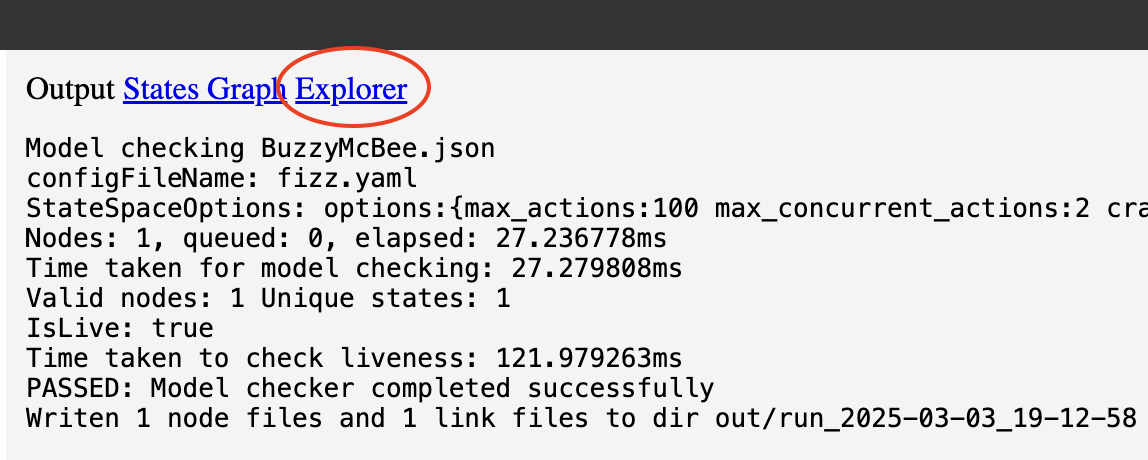
*The screenshot of the playground highlighting the Explorer link to open the Explorer view*
At present, it will only show the init state.
As we start filling in the details, you'll see more interactive exploration.
```graphviz
digraph G {
compound=true;
target="_blank";
subgraph "cluster_Coordinator#0" {
style=dashed;
label="Coordinator#0";
"Coordinator#0_placeholder" [label="" shape=point width=0 height=0 style=invis];
"Coordinator#0.status" [label="status = init" shape=ellipse];
}
subgraph "cluster_Participant#0" {
style=dashed;
label="Participant#0";
"Participant#0_placeholder" [label="" shape=point width=0 height=0 style=invis];
"Participant#0.status" [label="status = init" shape=ellipse];
}
subgraph "cluster_Participant#1" {
style=dashed;
label="Participant#1";
"Participant#1_placeholder" [label="" shape=point width=0 height=0 style=invis];
"Participant#1.status" [label="status = init" shape=ellipse];
}
"coordinator" [label="coordinator = role Coordinator#0" shape=ellipse];
"coordinator" -> "Coordinator#0_placeholder" [lhead="cluster_Coordinator#0"];
subgraph "cluster_null.participants" {
style=dashed;
label="participants";
"participants" [shape=plaintext, label=<
|
| role Participant#0 |
| role Participant#1 |
|
>];
}
"participants":0 -> "Participant#0_placeholder" [lhead="cluster_Participant#0"];
"participants":1 -> "Participant#1_placeholder" [lhead="cluster_Participant#1"];
}
```
### RPCs
RPCs are just functions, with the only difference being these will typically be called from another role. That is,
inter-role function calls are treated as RPCs, whereas intra-role function calls are treated as just helper functions.
Functions are defined using `func` keyword (As opposed to `def` in python and the `self` parameter is implicit)
```python
role Participant:
action Init:
self.status = "init"
func Prepare():
pass # To be filled in later
func Finalize():
pass # To be filled in later
```
### Actions
Actions are defined using `action` keyword.
```python
role Coordinator:
action Init:
self.status = "init"
action Commit:
pass # To be filled in later
```
### Implement RPCs and Actions
#### Participant
The `Participant` exposes two RPCs:
- **`Prepare`** (Phase 1): The participant decides whether it can commit the transaction.
- **`Finalize`** (Phase 2): The participant records the final decision.
##### Prepare Phase
On `Prepare`, a participant can either **prepare to commit** or **abort** the transaction. While real-world implementations have specific reasons for aborting, **our model only needs to capture whether the decision is `aborted` or `prepared`**, not why.
To express this, we use **non-determinism** with the `oneof` keyword:
```python
vote = oneof ["prepared", "aborted"]
```
This means the vote can be either `"prepared"` or `"aborted"`, and the model checker will explore both cases to ensure correctness.
Once the vote is determined, the participant stores the decision in `self.status` and returns the vote.
##### Finalize Phase
The `Finalize` function takes a single parameter - the final transaction `decision`. This decision is persisted in `self.status` to reflect whether the transaction was ultimately committed or aborted.
Participant Implementation
```python
role Participant:
action Init:
self.status = "init"
func Prepare():
vote = oneof ["prepared", "aborted"]
self.status = vote
return vote
func Finalize(decision):
self.status = decision
```
#### Coordinator Action: Commit
The `Coordinator` has a **`Commit`** action that runs the Two-Phase Commit protocol.
To ensure the protocol starts only once, we add a precondition to trigger the action only when the status is `"init"`.
When triggered, the status is set to `"working"`.
```diff
action Commit:
- pass # To be filled in later
+ require(self.status == "init")
+ self.status = "working"
```
Next, the coordinator iterates over the participants' list. For each participant, it calls **`Prepare`**.
If any participant votes `"aborted"`, the coordinator sets the status to `"aborted"`, triggers the second phase, and exits.
If all participants accept, it sets the status to `"committed"`.
```python
for p in participants:
vote = p.Prepare()
if vote == "aborted":
self.finalize("aborted")
return
self.finalize("committed")
```
The **`finalize`** function handles the second phase, persisting the decision and notifying each participant.
```python
func finalize(decision):
self.status = decision
for p in participants:
p.Finalize(decision)
```
Coordinator implementation:
```python
role Coordinator:
action Init:
self.status = "init"
action Commit:
require(self.status == "init")
self.status = "working"
for p in participants:
vote = p.Prepare()
if vote == "aborted":
self.finalize("aborted")
return
self.finalize("committed")
func finalize(decision):
self.status = decision
for p in participants:
p.Finalize(decision)
```
### Exploring the model
We now have a working description of what we want to design. Let us explore the design in the UI.
Run the following code in the playgroud.
"Run in playground" will open the snippet in the playground.
Then, click "Enable whiteboard" checkbox and click Run.

*The screenshot of the playground highlighting the Enable whiteboard and Run steps*
```fizz
---
# Disable deadlock detection for now. We will address it later.
deadlock_detection: false
---
role Coordinator:
action Init:
self.status = "init"
action Commit:
require(self.status == "init")
self.status = "working"
for p in participants:
vote = p.Prepare()
if vote == "aborted":
self.finalize("aborted")
return
self.finalize("committed")
func finalize(decision):
self.status = decision
for p in participants:
p.Finalize(decision)
role Participant:
action Init:
self.status = "init"
func Prepare():
vote = oneof ["prepared", "aborted"]
self.status = vote
return vote
func Finalize(decision):
self.status = decision
NUM_PARTICIPANTS = 2
action Init:
coordinator = Coordinator()
participants = []
for i in range(NUM_PARTICIPANTS):
participants.append(Participant())
```
Run it in the FizzBee playground: https://fizzbee.io/play
You can see the state diagram and explore how the state space can change. Additionally, you may notice how faults, like a thread crash, are simulated.
[FizzBee automatically simulates various types of faults](/design/tutorials/fault-injection/) to help model your system under these scenarios.
#### State graph
In the state diagram, you'll notice that when a thread crashes, the coordinator remains in the "working" state. However, there is no outgoing transition from this state, which implies a potential deadlock.
To allow for exploration of more interesting scenarios, we have temporarily disabled deadlock detection in this specification.
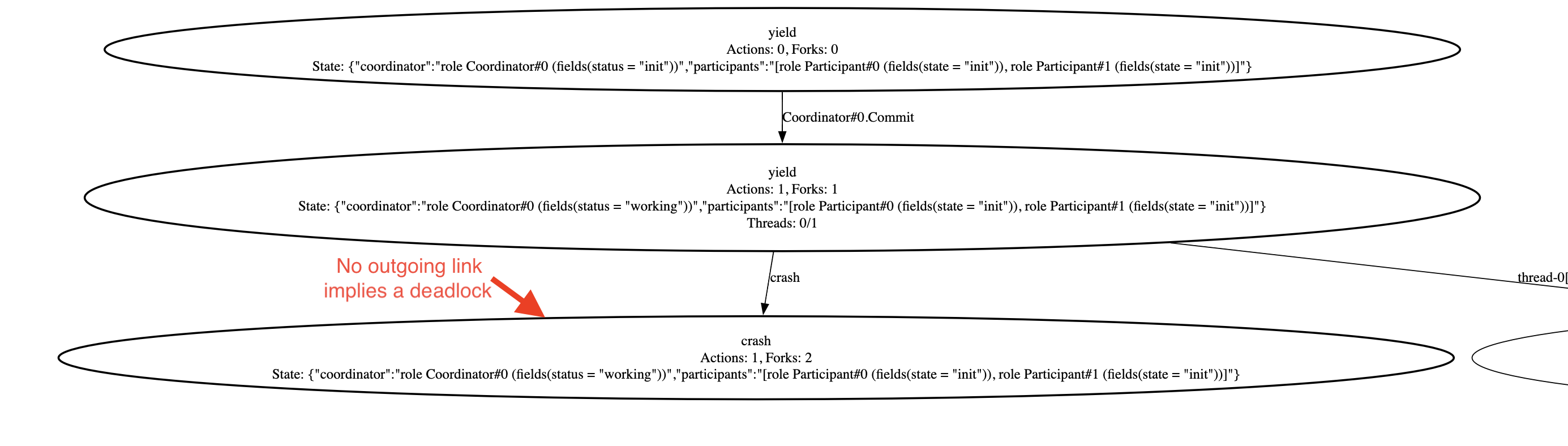
*State diagram illustrating thread crash modeling and resulting deadlock*
#### Communication diagram
```graphviz
digraph G {
node [shape=box];
splines=false;
rankdir=LR;
"Participant" [shape=none label=<
| Participant#0 |
| ⋮ |
| Participant#2 |
>]
"Coordinator" -> "Participant":p0 [label="Prepare, Finalize"];
"Coordinator" -> "Participant":p2 [label="Prepare, Finalize"];
"actionCoordinatorCommit" [label="" shape="none"]
"actionCoordinatorCommit" -> "Coordinator" [label="Commit"];
}
```
#### Explorer view
Now, open the explorer. On the left, you'll see the button labeled `"Coordinator#0.Commit"`, corresponding to the only action defined in the model.
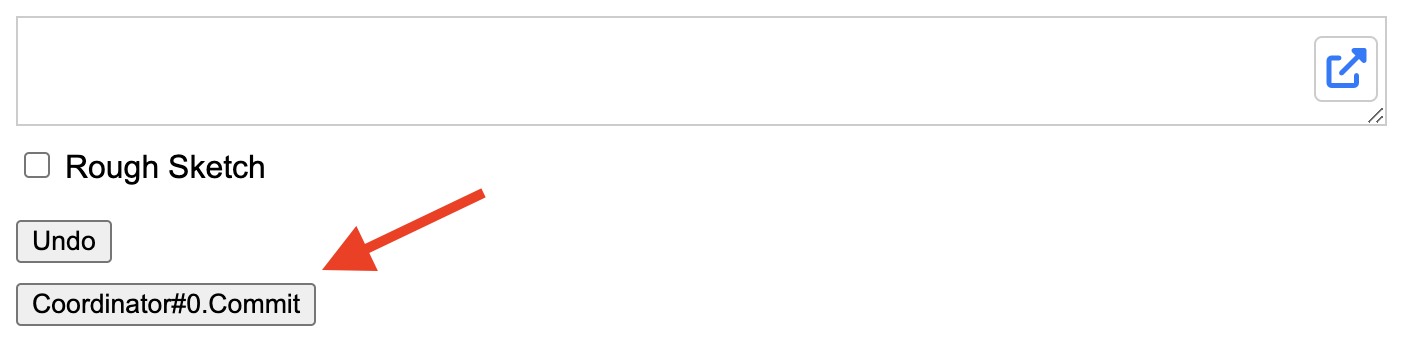
*Explorer action button for Coordinator#0.Commit*
Clicking it will change the Coordinator's state to `"working"`, which is the first statement in the `Commit` action.
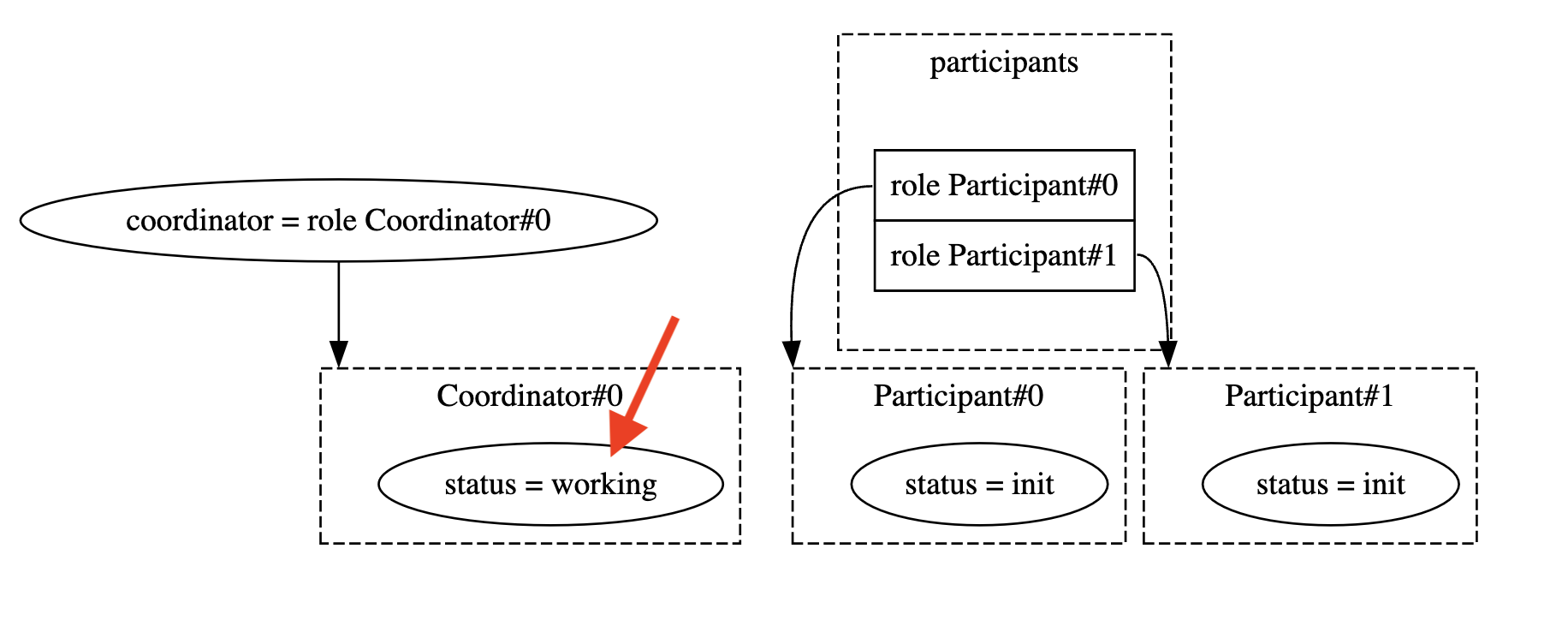
*Explorer view showing Coordinator#0.state = working*
On the left, you'll see two buttons.

*Explorer showing action buttons: 'action-1' or 'crash'*
Clicking "action-1" will proceed with the thread, initiating the `Prepare` RPC to `Participant#0`.
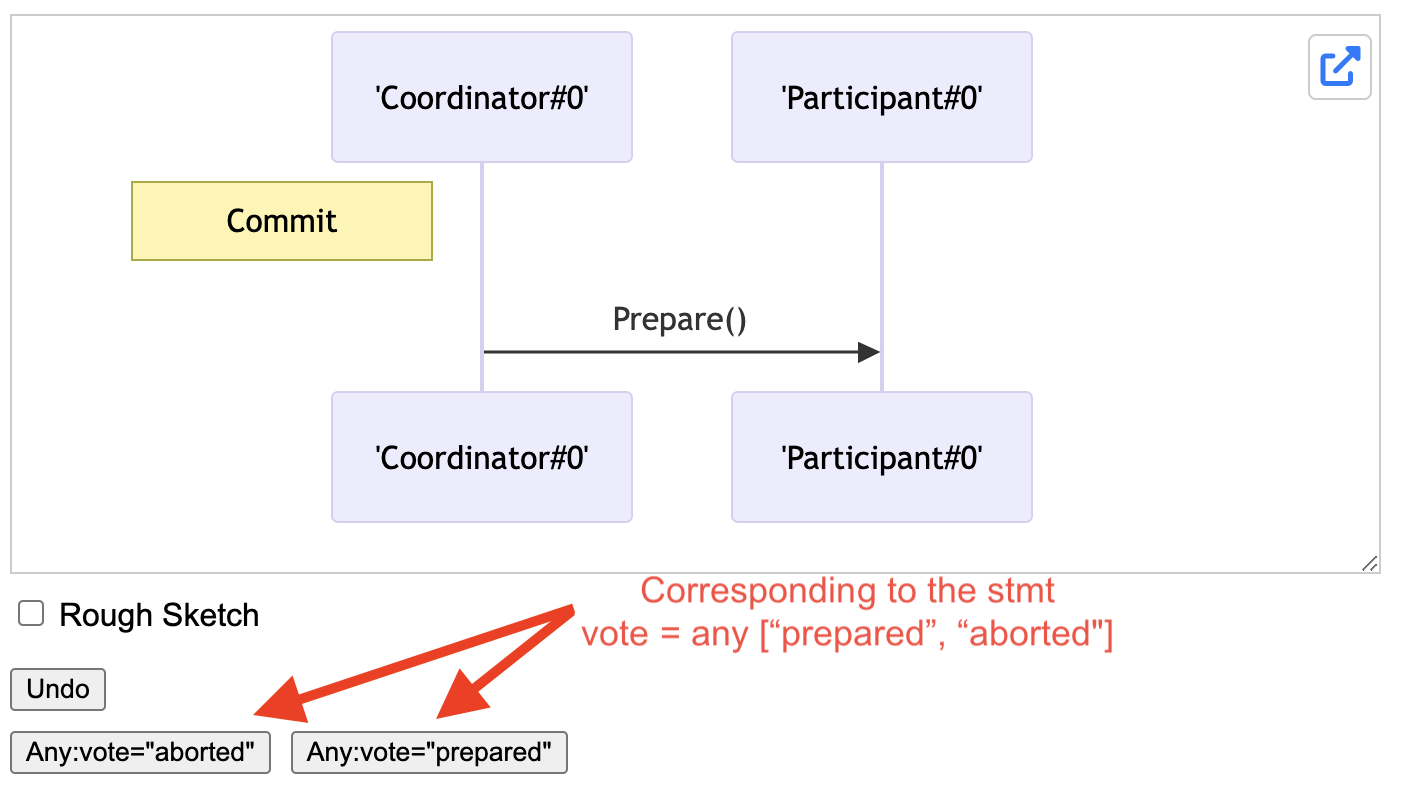
*Explorer view showing Participant#0 status options*
The first step for the `Participant` is choosing to either prepare or abort the transaction. Selecting `"Any:prepared"` shows the prepared path, changing `Participant#0.status` to `"prepared"` and returning.
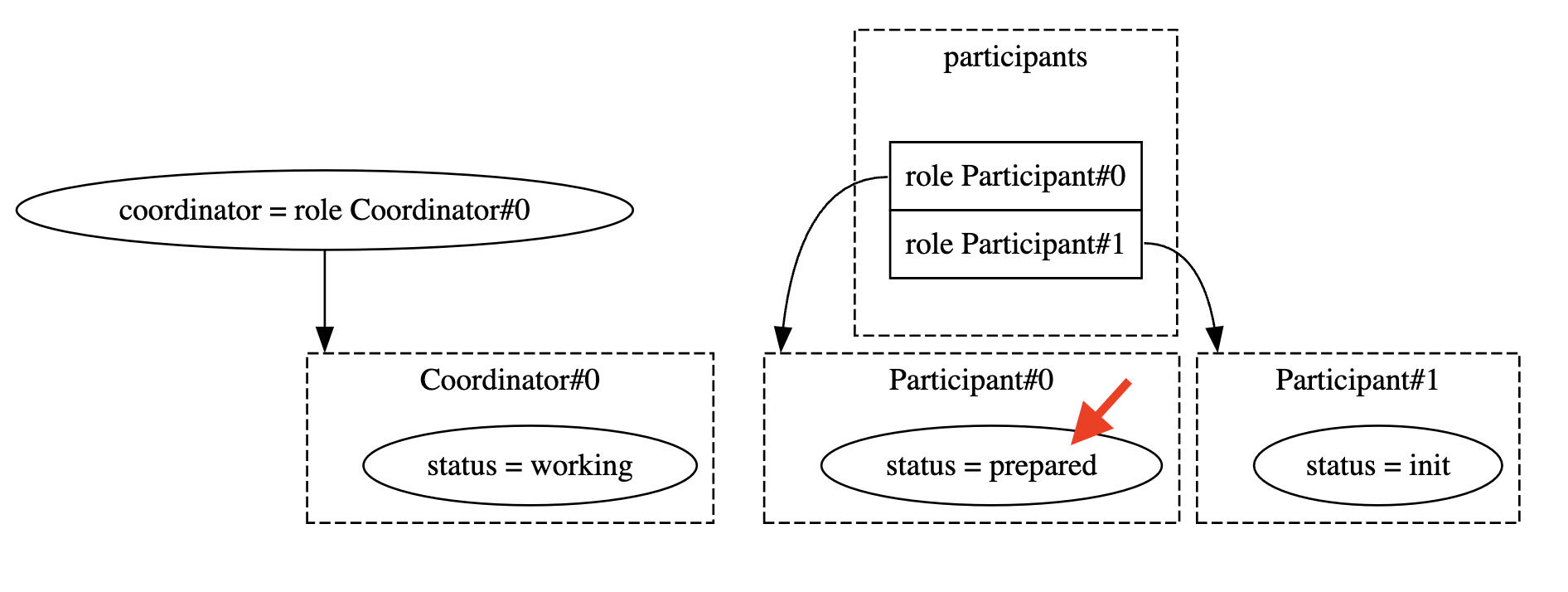
*Explorer view showing Participant#0.status = prepared*
You can explore the next steps and generate various sequence diagrams.
**All Committed**

*Explorer view showing all states committed*
**Aborted**
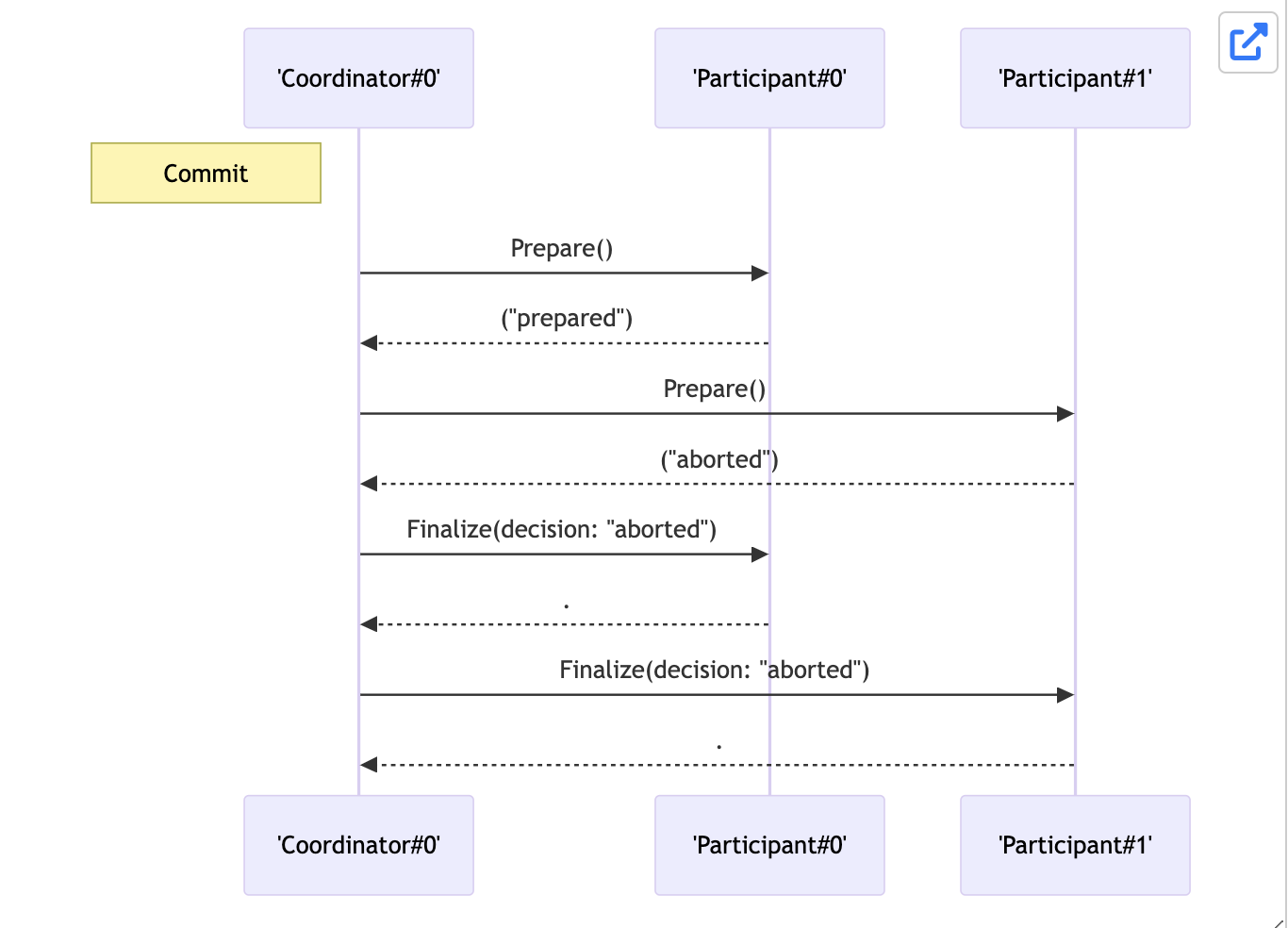
*Explorer view showing transaction aborted*
**Crashed**
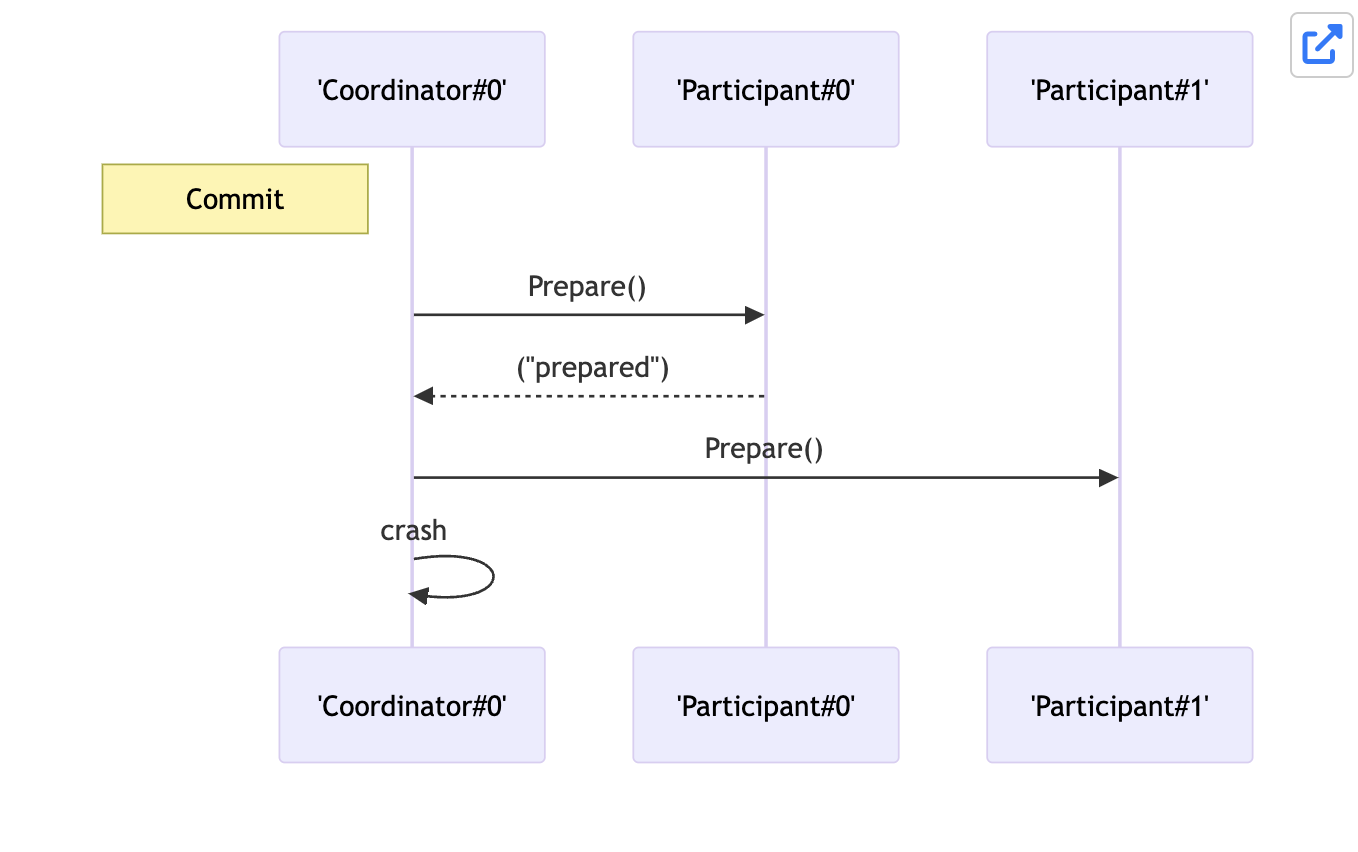
*Explorer view showing transaction crashed after 1st prepare*
In this state, you'll see the participants remain stuck in `"prepared"` state.

*Explorer view showing transaction crashed after 1st prepare*
## Validation
While you can use FizzBee to model your system, explore and simulate various scenarios, and look at how the state variables change,
it would be nicer to add some assertions to the state.
This is called model checking.
### Safety invariant
The critical invariant is, to confirm there is no state where one participant committed but another participant aborted.
```python
always assertion ParticipantsConsistent:
for p1 in participants:
for p2 in participants:
if p1.status == 'committed' and p2.status == 'aborted':
return False
return True
```
### Liveness invariant
While the safety property shows `ParticipantsConsistent`, there is no state where one participant committed but another one aborted.
However, this could be easily achieved with not having any actions (for example, comment out the `Commit` action) or just
trivially aborting all transactions. One thing we would want to verify is, is there at least one state were every participant committed.
```python
exists assertion AllParticipantsCommitted:
for p1 in participants:
if p1.status != 'committed':
return False
return True
```
Note, this is not an LTL property. This is part of the CTL logic equivalent to `EF p` where p is the predicate
## Extension: Timeout
In the current system, if the process crashes in between, the participants that `prepared` the transaction would be
stuck in that state forever. Ideally, we would want all the participants to either commit or abort.
Since commit cannot be guaranteed, one way to force convergence is to use a timeout.
### Liveness invariant
```python
eventually always assertion CoordinatorTerminated:
return coordinator.status != 'working'
```
```python
eventually always assertion AllParticipantsTerminated:
for p1 in participants:
if p1.status == 'prepared':
return False
return True
```
When you run this, you will see the trace that when the node crashes, the system will not reach terminal state.
### Timeout attempt 1: Simply abort
Let us start with a naive attempt.
```python
role Coordinator:
# ... other actions and functions
action Timeout:
self.finalize("aborted")
```
```fizz
role Coordinator:
action Init:
self.status = "init"
action Commit:
require(self.status == "init")
self.status = "working"
for p in participants:
vote = p.Prepare()
if vote == "aborted":
self.finalize("aborted")
return
self.finalize("committed")
func finalize(decision):
self.status = decision
for p in participants:
p.Finalize(decision)
action Timeout:
self.finalize("aborted")
role Participant:
action Init:
self.status = "init"
func Prepare():
vote = oneof ["prepared", "aborted"]
self.status = vote
return vote
func Finalize(decision):
self.status = decision
NUM_PARTICIPANTS = 2
action Init:
coordinator = Coordinator()
participants = []
for i in range(NUM_PARTICIPANTS):
participants.append(Participant())
always assertion ParticipantsConsistent:
for p1 in participants:
for p2 in participants:
if p1.status == 'committed' and p2.status == 'aborted':
return False
return True
exists assertion AllParticipantsCommitted:
for p1 in participants:
if p1.status != 'committed':
return False
return True
eventually always assertion CoordinatorTerminated:
return coordinator.status != 'working'
eventually always assertion AllParticipantsTerminated:
for p1 in participants:
if p1.status == 'prepared':
return False
return True
```
Run it in the FizzBee playground: https://fizzbee.io/play
You will see the following error trace.
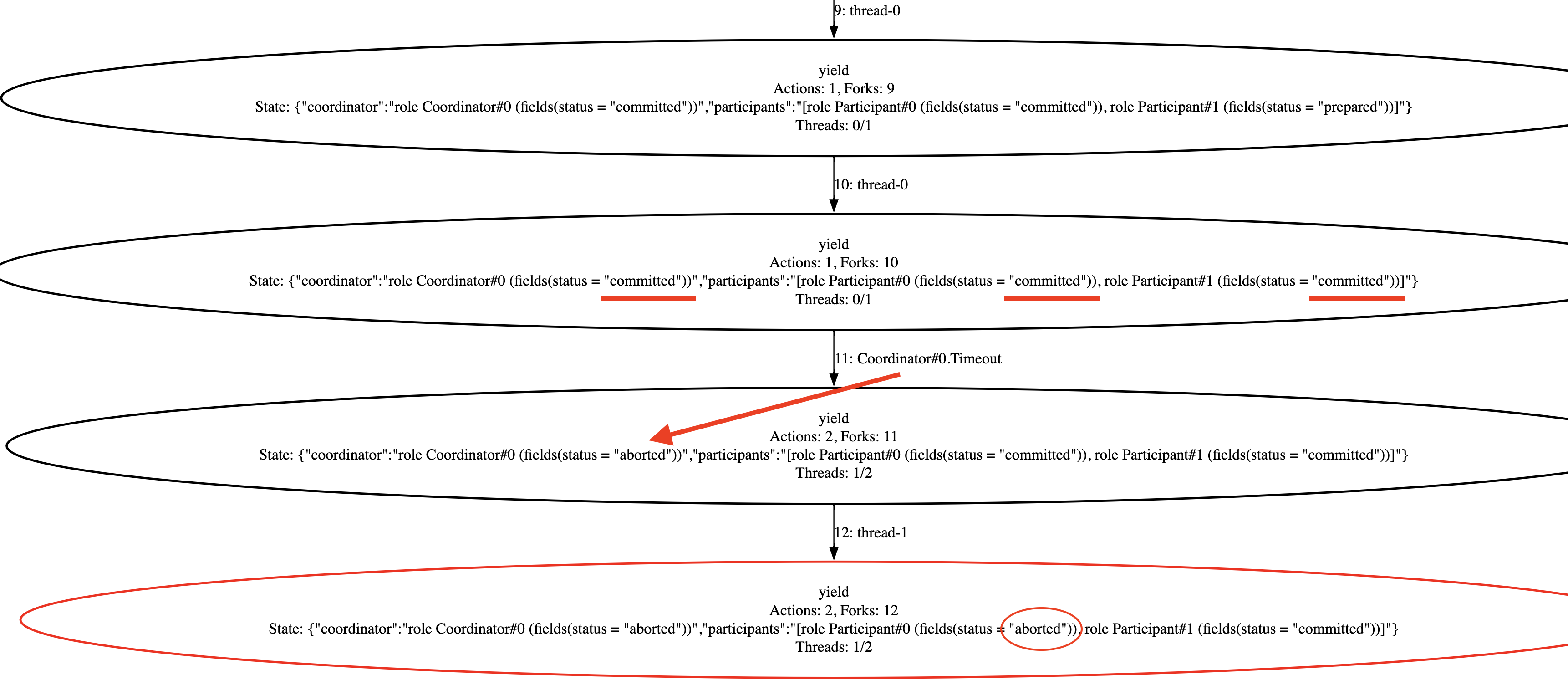
*Error trace showing a timeout occurring after all participants have committed*
The issue here is that even after all participants have committed, the timeout action can still be triggered, causing the transaction to start aborting.
You can see this behavior in the error details view:
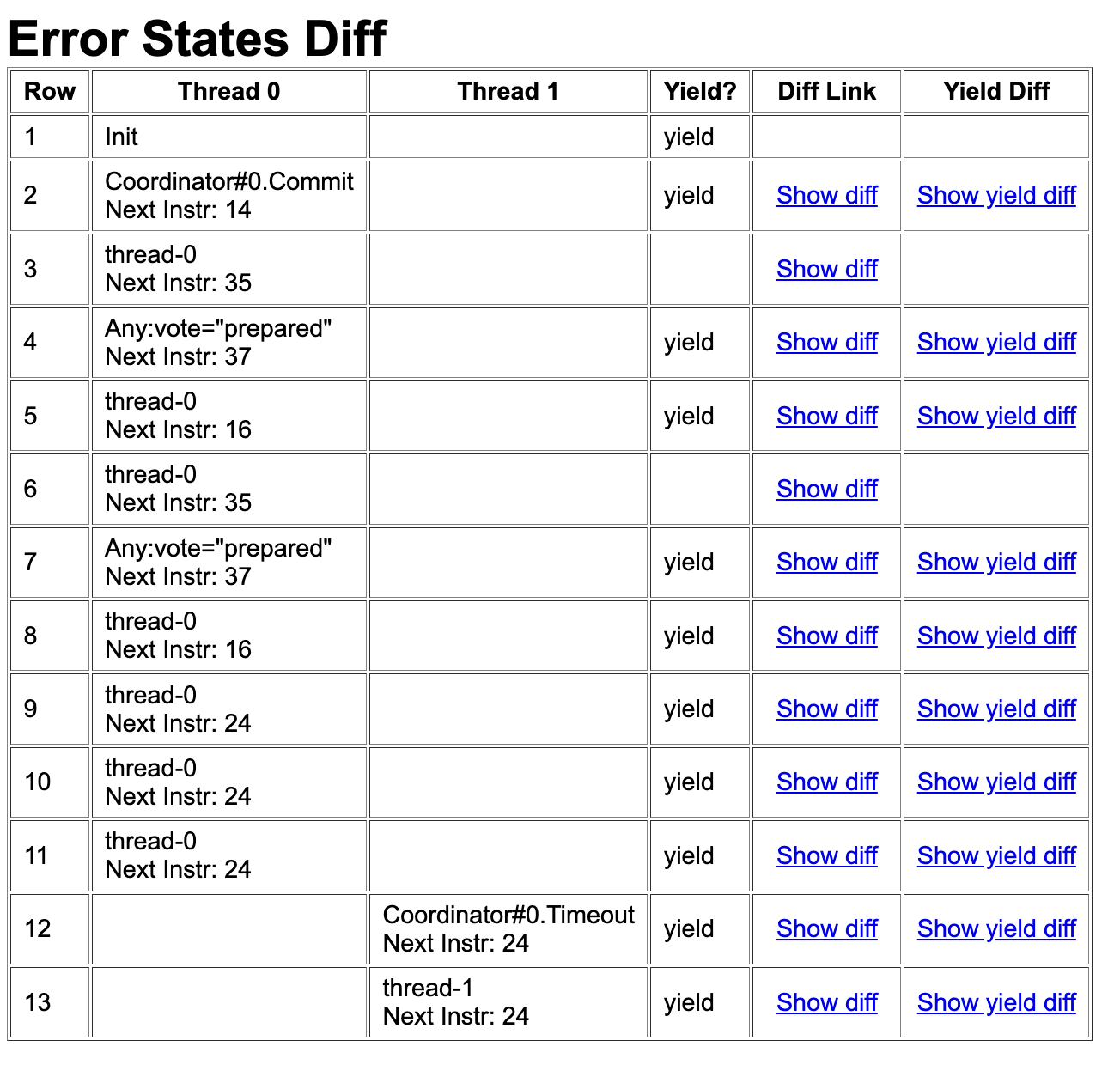
*Error details showing how a timeout is incorrectly triggered after commit*
And it is also reflected in the sequence diagram:
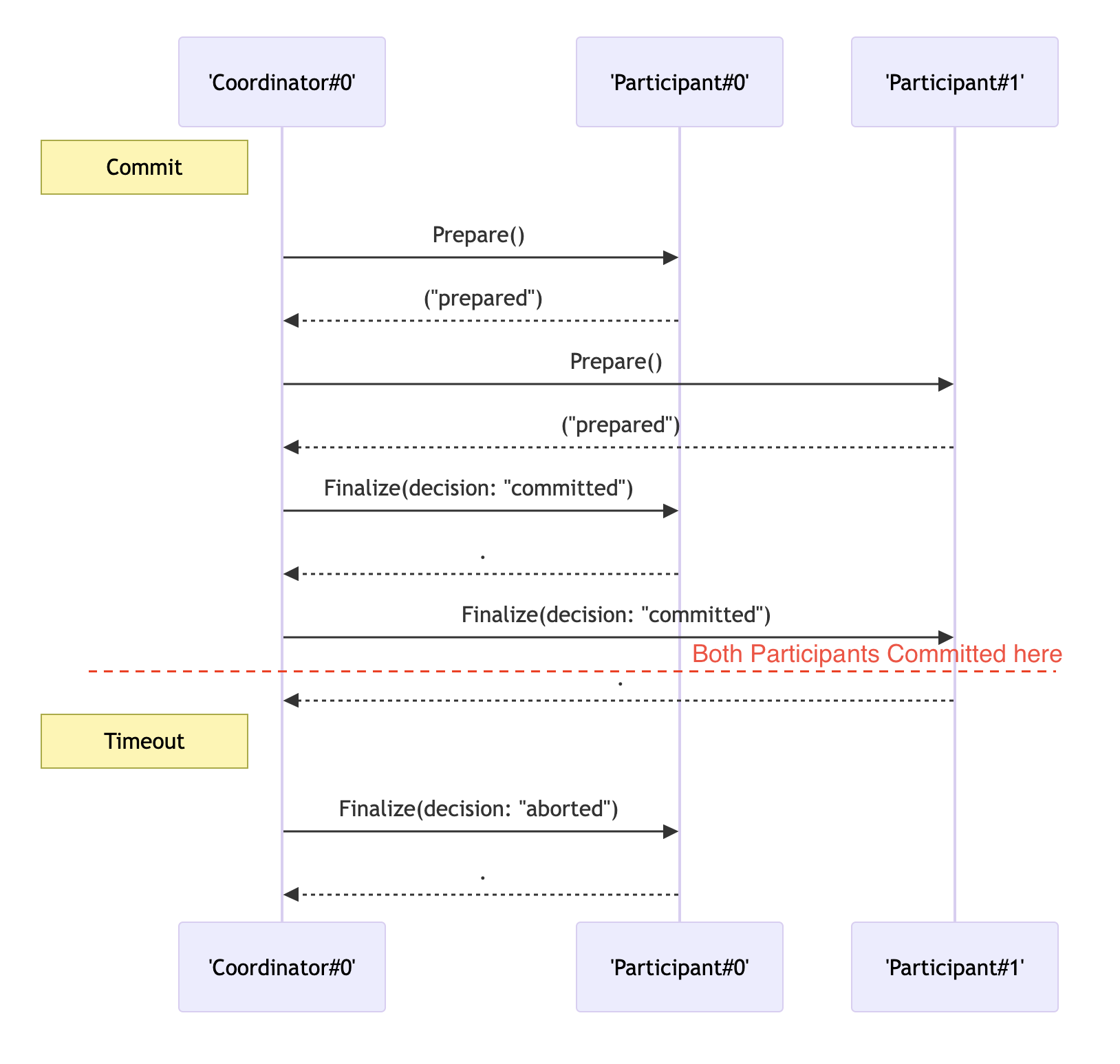
*Sequence diagram illustrating the timeout incorrectly triggering after commit*
### Timeout attempt 2: Abort transaction if not committed
Add a precondition that only transaction that is not committed must be aborted.
```python
action Timeout:
require(self.status != "committed") # <--- This is the only changed line here
self.finalize("aborted")
```
While the previous error is fixed, this scenario reveals a different issue.
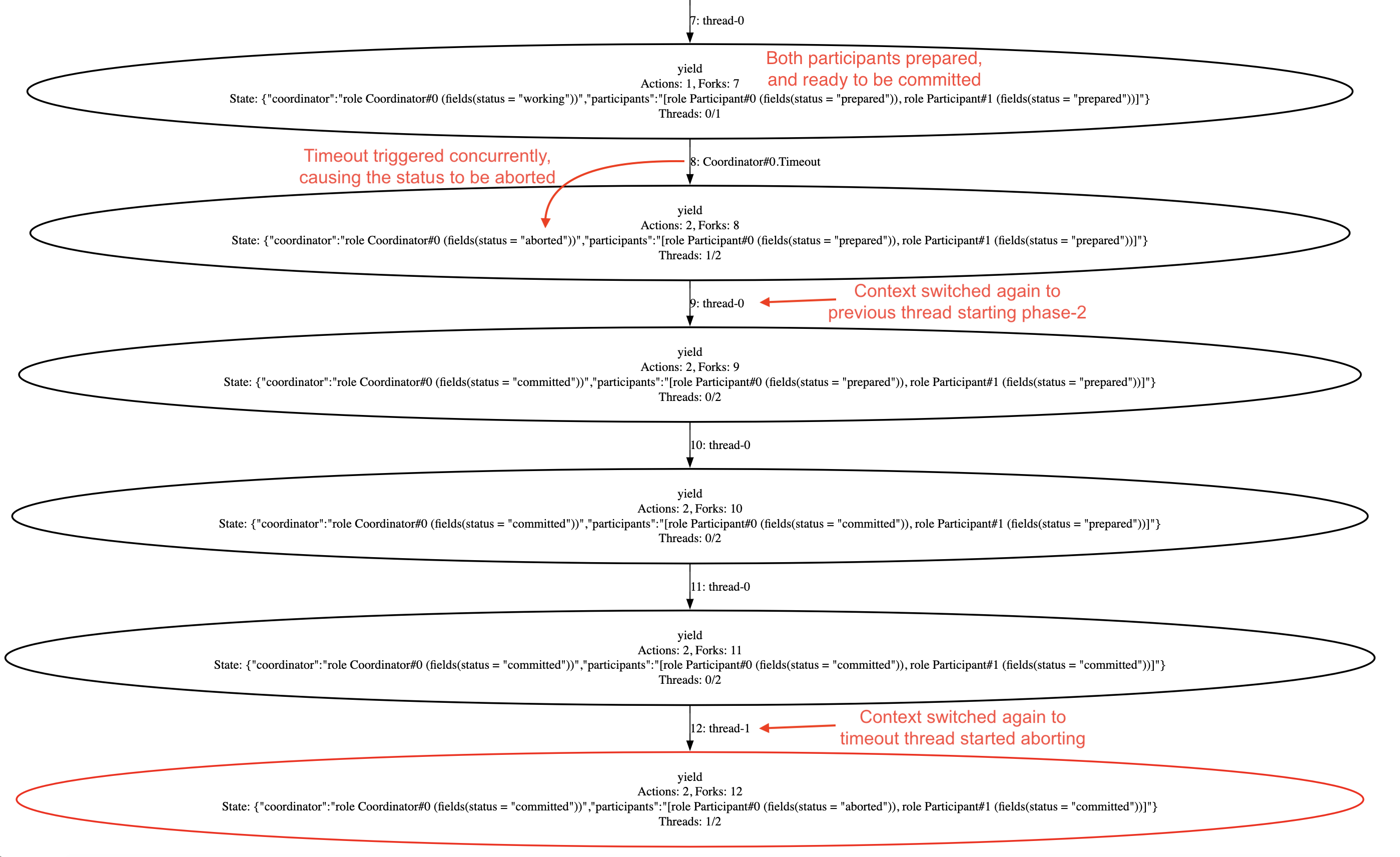
*Error trace showing a timeout occurring before Phase 2, leading to inconsistency*
Once both participants have prepared but before the coordinator receives the last participant's response, if the timeout handler is triggered, it will decide to abort the transaction. Then, if the context switches back to the commit thread, it will proceed with Phase 2 and commit the transaction.
Once that is done, the timeout handler can still continue executing the abort path, leading to an inconsistent state. The error details view clearly highlights this context switching issue.
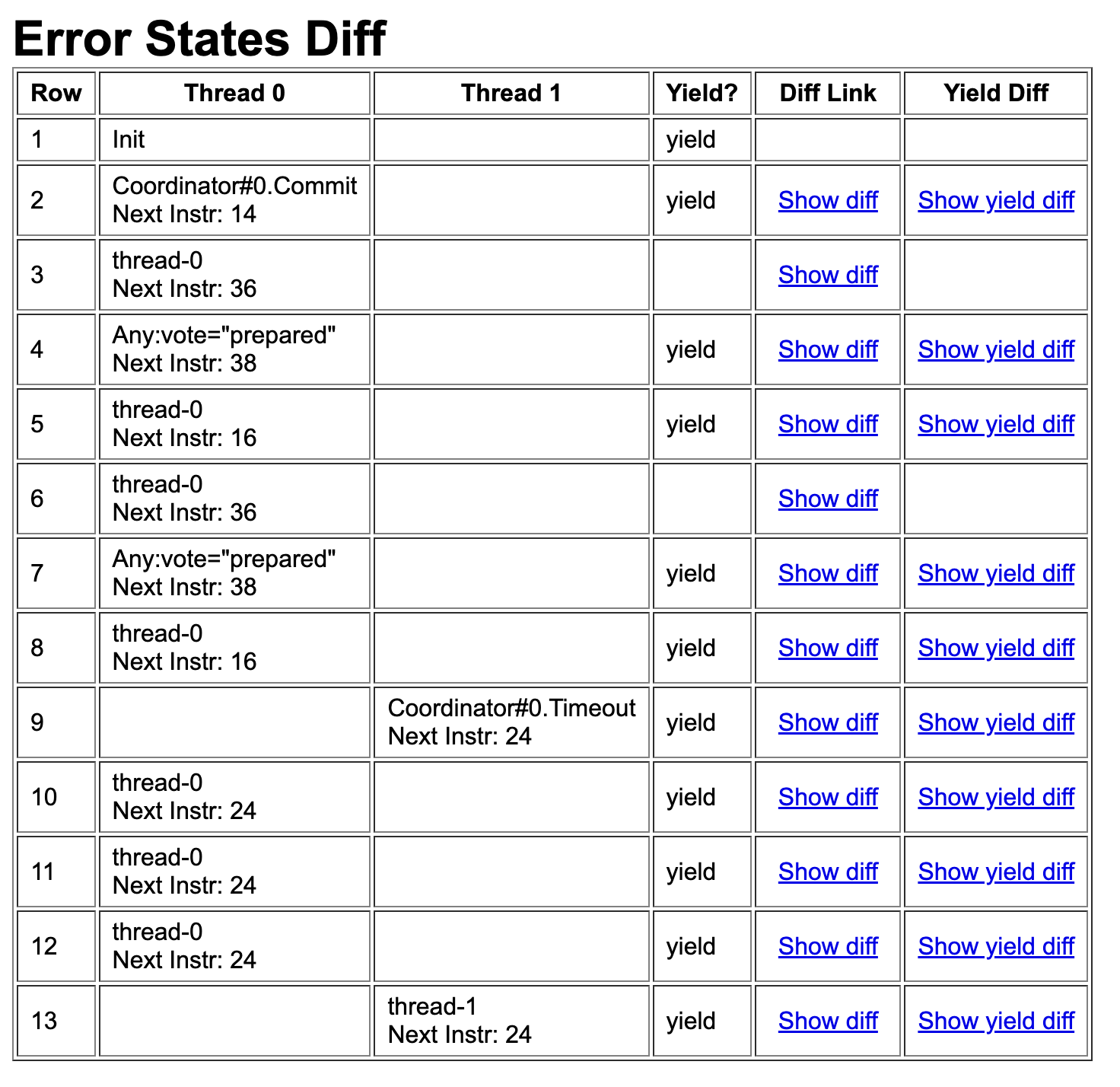
*Error details highlighting how a timeout before Phase 2 leads to an inconsistent state*
### Timeout attempt 3: Finalize only in working status
```python
func finalize(decision):
require(self.status == "working") # <-- This is the only changed line
self.status = decision
for p in participants:
p.Finalize(decision)
```
When you run it, it will show a new error.
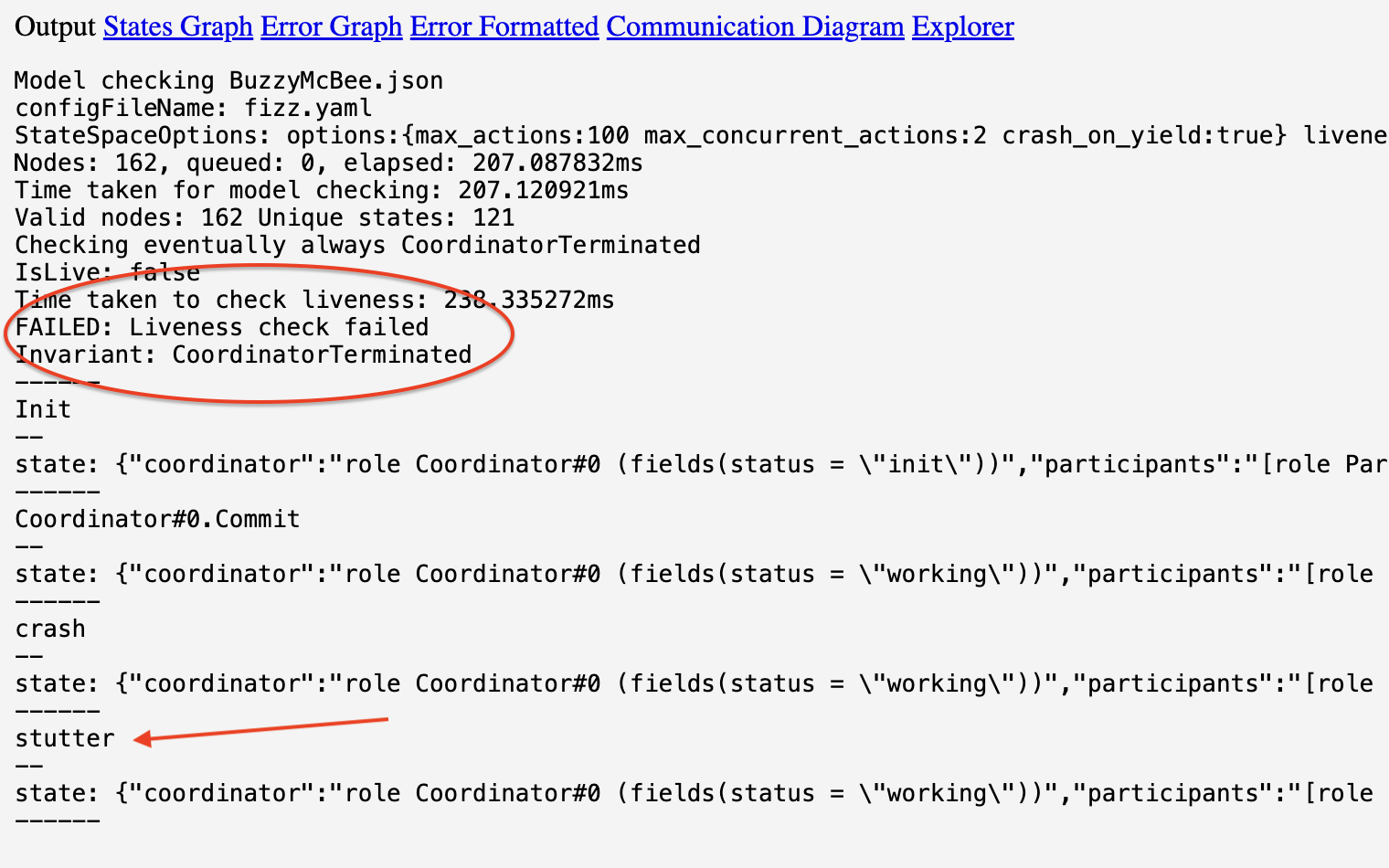
*Error details highlighting how a timeout before Phase 2 leads to an inconsistent state*
This time it is a liveness error caused by stuttering. The fix is simply
to mark the timeout action to be fair.
```udiff
@@ -25,7 +25,7 @@
for p in participants:
p.Finalize(decision)
- action Timeout:
+ fair action Timeout:
require(self.status != "committed")
self.finalize("aborted")
```
This will now show a different error.
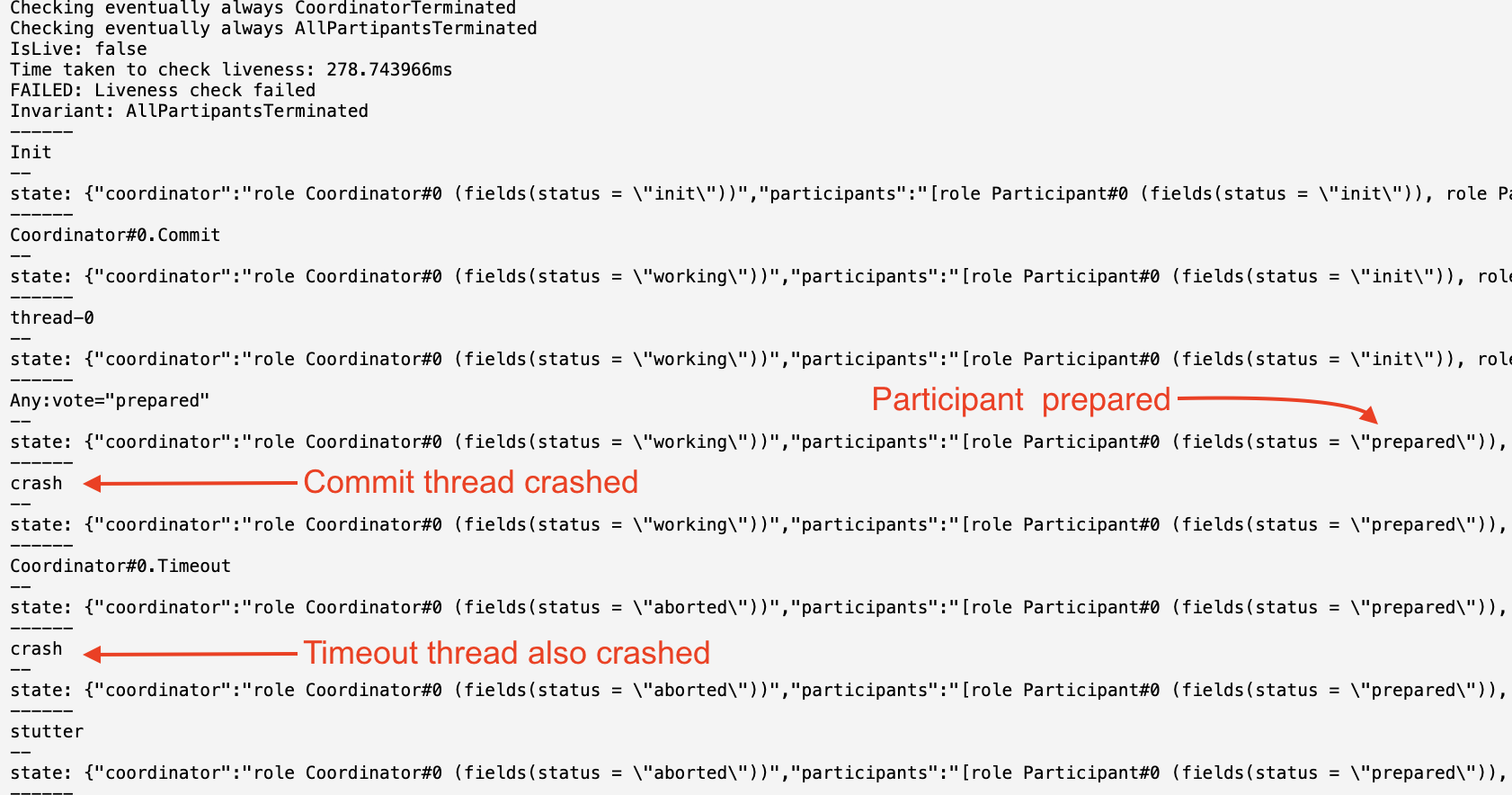
*Error details highlighting how a timeout before Phase 2 leads to an inconsistent state*
### Timeout attempt 4: Allow timeout to retry
Allow the finalize if the decision is the same as the previously decided value.
```diff
@@ -20,7 +20,7 @@
self.finalize("committed")
func finalize(decision):
- require(self.status == "working")
+ require(self.status in ["working", decision])
self.status = decision
for p in participants:
p.Finalize(decision)
```
This will fix that, but show the scenario where the thread crashed after coordinator decided to commit.

*Error details highlighting how a timeout before Phase 2 leads to an inconsistent state*
### Timeout attempt 5: Allow timeout handler to retry commit as well
```diff
fair action Timeout:
- require(self.status != "committed")
- self.finalize("aborted")
+ if self.status == "committed":
+ self.finalize("committed")
+ else:
+ self.finalize("aborted")
```
This will fix the liveness issue as well.
## Complete code
```fizz
role Coordinator:
action Init:
self.status = "init"
action Commit:
require(self.status == "init")
self.status = "working"
for p in participants:
vote = p.Prepare()
if vote == "aborted":
self.finalize("aborted")
return
self.finalize("committed")
func finalize(decision):
require(self.status in ["working", decision])
self.status = decision
for p in participants:
p.Finalize(decision)
fair action Timeout:
if self.status == "committed":
self.finalize("committed")
else:
self.finalize("aborted")
role Participant:
action Init:
self.status = "init"
func Prepare():
vote = oneof ["prepared", "aborted"]
self.status = vote
return vote
func Finalize(decision):
self.status = decision
NUM_PARTICIPANTS = 2
action Init:
coordinator = Coordinator()
participants = []
for i in range(NUM_PARTICIPANTS):
participants.append(Participant())
always assertion ParticipantsConsistent:
for p1 in participants:
for p2 in participants:
if p1.status == 'committed' and p2.status == 'aborted':
return False
return True
exists assertion AllPartipantsCommitted:
for p1 in participants:
if p1.status != 'committed':
return False
return True
eventually always assertion CoordinatorTerminated:
return coordinator.status != 'working'
eventually always assertion AllPartipantsTerminated:
for p1 in participants:
if p1.status == 'prepared':
return False
return True
```
Run it in the FizzBee playground: https://fizzbee.io/play
## Diagrams
### Communication Diagram
Click on the `Communication Diagram` link to see the communication diagram.
This shows the various roles and the messages exchanged between them.
```graphviz
digraph G {
node [shape=box];
splines=false;
rankdir=LR;
"Participant" [shape=none label=<
| Participant#0 |
| ⋮ |
| Participant#2 |
>]
"Coordinator" -> "Participant":p0 [label="Prepare, Finalize"];
"Coordinator" -> "Participant":p2 [label="Prepare, Finalize"];
"actionCoordinatorCommit" [label="" shape="none"]
"actionCoordinatorCommit" -> "Coordinator" [label="Commit"];
"FairActionCoordinator" [shape=none label=<>]
{ rank=same; "Coordinator"; "FairActionCoordinator"; }
"FairActionCoordinator":Timeout -> "Coordinator" [label="Timeout"];
}
```
### Interactive Sequence Diagram
This is a more detailed diagram. To generate this, first enable whiteboard and then run.
You will see `Explorer` link, click to open it.
On the left, play with the buttons to generate the sequence diagram.
```mermaid
sequenceDiagram
note left of 'Coordinator#0': Commit
'Coordinator#0' ->> 'Participant#0': Prepare()
'Participant#0' -->> 'Coordinator#0': ("prepared")
'Coordinator#0' ->> 'Participant#1': Prepare()
'Participant#1' -->> 'Coordinator#0': ("prepared")
'Coordinator#0' ->> 'Participant#0': Commit()
'Participant#0' -->> 'Coordinator#0': .
'Coordinator#0' ->> 'Participant#1': Commit()
'Participant#1' -->> 'Coordinator#0': .
```
### Whiteboard diagram
```graphviz
digraph G {
compound=true;
target="_blank";
subgraph "cluster_Coordinator#0" {
style=dashed;
label="Coordinator#0";
"Coordinator#0_placeholder" [label="" shape=point width=0 height=0 style=invis];
"Coordinator#0.status" [label="status = committed" shape=ellipse];
}
subgraph "cluster_Participant#0" {
style=dashed;
label="Participant#0";
"Participant#0_placeholder" [label="" shape=point width=0 height=0 style=invis];
"Participant#0.status" [label="status = committed" shape=ellipse];
}
subgraph "cluster_Participant#1" {
style=dashed;
label="Participant#1";
"Participant#1_placeholder" [label="" shape=point width=0 height=0 style=invis];
"Participant#1.status" [label="status = committed" shape=ellipse];
}
"coordinator" [label="coordinator = role Coordinator#0" shape=ellipse];
"coordinator" -> "Coordinator#0_placeholder" [lhead="cluster_Coordinator#0"];
subgraph "cluster_null.participants" {
style=dashed;
label="participants";
"participants" [shape=plaintext, label=<
|
| role Participant#0 |
| role Participant#1 |
|
>];
}
"participants":0 -> "Participant#0_placeholder" [lhead="cluster_Participant#0"];
"participants":1 -> "Participant#1_placeholder" [lhead="cluster_Participant#1"];
}
```
## Compare with other modeling languages
### Comparison with P
Compare this with the P model checker code.
https://github.com/p-org/P/tree/master/Tutorial/2_TwoPhaseCommit/PSrc
If you notice, the FizzBee code is more concise and closer to pseudocode.
In addition to being concise, FizzBee does exhaustive model checking. Whereas, P does not.
It explores various paths heuristically. That means, P cannot verify the correctness of the system, but FizzBee can.
### Comparison with TLA+
This TLA+ example is written by Leslie Lamport in TLA+:
https://github.com/tlaplus/Examples/blob/master/specifications/transaction_commit/TwoPhase.tla
Take a look at the readability of the FizzBee spec vs the TLA+ spec, making FizzBee a viable
alternative to TLA+ and the easiest formal methods language so far.
### Comparison with PlusCal
I couldn't find a pure PlusCal implementation, but a slightly modified version
https://github.com/muratdem/PlusCal-examples/blob/master/2PCTM/2PCwithBTM.tla
Note: This post shows the Actor/Object oriented style of implementation.
FizzBee is a multi-paradigm language, so you can use the style that suits you best.
- [Two phase commit - functional style](/design/examples/two_phase_commit/)
- [Two phase commit - procedural style](/design/examples/two_phase_commit_procedural/)