# Quick Start: Modeling and Validating Distributed Systems in FizzBee
> Model a gossip protocol and watch the model checker find design flaws for you. A hands-on introduction to formal methods for distributed systems.
Canonical: https://fizzbee.io/design/tutorials/quick-start/
## Introduction
In this tutorial, we’ll model a simplified distributed system using FizzBee, providing an accessible introduction to formal modeling. The goal is to show how formal methods can help engineers model and validate system behavior in a structured and practical way, without requiring deep prior knowledge of formal methods.
## The Gossip Protocol
A gossip protocol is a communication mechanism where nodes (servers) periodically exchange information with randomly selected peers. Over time, this ensures that all nodes converge to a consistent state.
### Simplified Gossip Protocol
- **N servers**, each with a data version (an integer, starting at 1).
- Each server keeps an **in-memory cache** of known versions from other servers.
- Periodically, a server picks another server and **exchanges information**.
- The goal is for all servers to eventually converge on the **latest version** of all other servers.
## Overview of the Process
In this tutorial, we’ll walk through the process of modeling and validating a distributed system using FizzBee.
**Note:**
The steps are broken down into smaller, digestible chunks to ensure clarity for beginners with little to no prior experience in formal methods. Formal methods experts may choose to combine or skip certain steps as needed, but the goal here is to make the process accessible and practical for all levels.
The process includes:
1. **Draw the Rough Design**: Explicitly define what the system should look like. This step helps prevent writer’s block when starting the first model by eliminating the confusion between *what* to model and *how* to model it. By outlining a rough design, you create a clear foundation, making the transition to formal modeling smoother.
2. **Translate to FizzBee Spec**: Convert the rough design into a corresponding FizzBee specification, mapping nodes to roles and selecting appropriate data structures.
3. **Run the Model Checker**: Use FizzBee’s model checker to validate the design and generate initial diagrams.
4. **Define Methods & Call Interactions**: Identify the key methods and model how services communicate with each other.
5. **Translate Pseudo Code to FizzBee Statements**: Express the system’s pseudocode as formal FizzBee statements.
6. **Review Sequence Diagrams & State Changes**: Analyze the generated sequence diagrams and check for expected state transitions.
7. **Add Durability & Ephemeral Annotations**: Mark the system’s components to differentiate between persistent and temporary states.
8. **Define Safety & Liveness Properties**: Specify the system’s safety and liveness requirements to ensure correctness.
9. **Share Your Spec for Review**: Once your spec is ready, share it with your team for feedback.
## Rough Design of the Gossip Protocol
For our protocol, the states will look something like this.
- There are 3 servers, each with a version number.
- There is a cache. For now, representing it as a list indexed by the server index, it could be a key value pair
- They all can talk to each other.
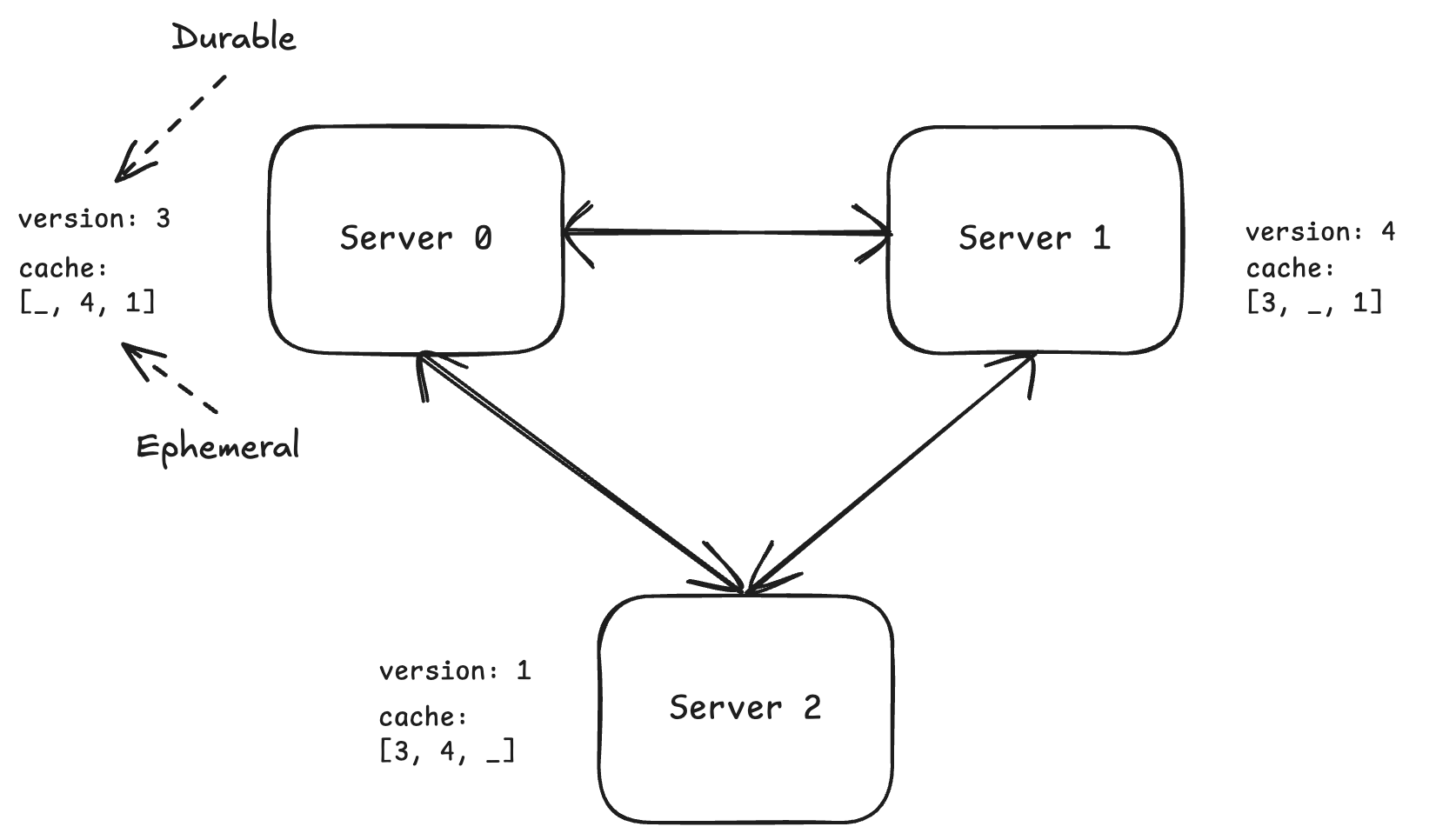
*Rough Design of the Gossip Protocol*
## Translate to FizzBee Spec
There is only one type of service in our design, so we can define a single role `Server`.
```python
role Server:
pass # Empty block, we'll replace this later
```
**Note:**
`pass` in fizzbee is the same as `pass` in python. It is a placeholder for an empty statement or an block.
Equivalent to `{}` or `;` in C, Java, and other languages.
Now, we just need to create three servers and initialize them.
```python
NUM_SERVERS=3
action Init:
servers = []
for i in range(NUM_SERVERS):
servers.append(Server())
```
The Init action is the starting point of the model. It initializes the system by creating three servers and storing them in a list.
Any state variable at the end of the scope of Init is considered part of the state of the system.
```fizz
---
# Temporarily disable deadlock detection.
deadlock_detection: false
---
NUM_SERVERS=3
role Server:
pass
action Init:
servers = []
for i in range(NUM_SERVERS):
servers.append(Server())
```
Run it in the FizzBee playground: https://fizzbee.io/play
FizzBee defines the state transitions to model and validate the design. Once the system is initialized,
we haven't defined what next steps can happen. So, according to the protocol it is considered a deadlock.
Disable this deadlock detection for now, by specifying the `deadlock_detection: false` in the YAML config.
The config can be added as a frontmatter.
### Run the model checker and see the results.
Check the `Enable Whiteboard` checkbox and click `Run` in the playground. Then click the `explorer` link.
This will show a block diagram like this.
```graphviz
digraph G {
compound=true;
target="_blank";
subgraph "cluster_Server#0" {
style=dashed;
label="Server#0";
"Server#0_placeholder" [label="" shape=point width=0 height=0 style=invis];
}
subgraph "cluster_Server#1" {
style=dashed;
label="Server#1";
"Server#1_placeholder" [label="" shape=point width=0 height=0 style=invis];
}
subgraph "cluster_Server#2" {
style=dashed;
label="Server#2";
"Server#2_placeholder" [label="" shape=point width=0 height=0 style=invis];
}
subgraph "cluster_null.servers" {
style=dashed;
label="servers";
"servers" [shape=plaintext, label=<
|
| role Server#0 |
| role Server#1 |
| role Server#2 |
|
>];
}
"servers":0 -> "Server#0_placeholder" [lhead="cluster_Server#0"];
"servers":1 -> "Server#1_placeholder" [lhead="cluster_Server#1"];
"servers":2 -> "Server#2_placeholder" [lhead="cluster_Server#2"];
}
```
Indicating, there are three servers. Each of these servers do not have any states.
### Define the states
Let's add two variables, `version` and `cache`. The `version` is an integer, and the `cache` is a list of integers.
The expressions are starlark (a limited Python subset) statements. Similar to Python's __init__ function of a class,
the state variables will be defined in the `Server` role's `Init` action.
```python
role Server:
action Init:
self.version = 1
self.cache = [0] * NUM_SERVERS
```
The spec will now look like this.
**Note:**
The `self` keyword is used to refer to the current instance of the class.
It is similar to `self` in Python or `this` in other languages like Java, C++, etc.
Also note, we don't need the `pass` statement anymore as role block is not empty anymore.
```fizz
---
deadlock_detection: false
---
NUM_SERVERS=3
role Server:
action Init:
self.version = 1
self.cache = [0] * NUM_SERVERS
action Init:
servers = []
for i in range(NUM_SERVERS):
servers.append(Server())
```
Run it in the FizzBee playground: https://fizzbee.io/play
Now, run the model and check the explorer. You should see,
```graphviz
digraph G {
compound=true;
target="_blank";
subgraph "cluster_Server#0" {
style=dashed;
label="Server#0";
"Server#0_placeholder" [label="" shape=point width=0 height=0 style=invis];
subgraph "cluster_Server#0.cache" {
style=dashed;
label="cache";
"Server#0.cache" [shape=plaintext, label=<>];
}
"Server#0.version" [label="version = 1" shape=ellipse];
}
subgraph "cluster_Server#1" {
style=dashed;
label="Server#1";
"Server#1_placeholder" [label="" shape=point width=0 height=0 style=invis];
subgraph "cluster_Server#1.cache" {
style=dashed;
label="cache";
"Server#1.cache" [shape=plaintext, label=<>];
}
"Server#1.version" [label="version = 1" shape=ellipse];
}
subgraph "cluster_Server#2" {
style=dashed;
label="Server#2";
"Server#2_placeholder" [label="" shape=point width=0 height=0 style=invis];
subgraph "cluster_Server#2.cache" {
style=dashed;
label="cache";
"Server#2.cache" [shape=plaintext, label=<>];
}
"Server#2.version" [label="version = 1" shape=ellipse];
}
subgraph "cluster_null.servers" {
style=dashed;
label="servers";
"servers" [shape=plaintext, label=<
|
| role Server#0 |
| role Server#1 |
| role Server#2 |
|
>];
}
"servers":0 -> "Server#0_placeholder" [lhead="cluster_Server#0"];
"servers":1 -> "Server#1_placeholder" [lhead="cluster_Server#1"];
"servers":2 -> "Server#2_placeholder" [lhead="cluster_Server#2"];
}
```
## Define the RPC methods and actions
In the gossip protocol, we expect only one RPC method. Let's call it `gossip()` in each of these servers.
```python
func gossip(received_cache):
pass # Empty block, we'll fill this later
```
Someone should trigger this. Let's add a `GossipTimer` action to the `Server` role.
An action is almost similar to the `func`. The only difference is the func are called by other functions or actions,
where as actions are called by the some part of the system that is outside what we are modelling.
For example, `action` could represent an external client event, a timer, or user action and so on.
The GossipTimer will trigger the `gossip` method in an arbitrarily selected server.
```python
action GossipTimer:
i = oneof range(NUM_SERVERS)
server = servers[i]
server.gossip(self.cache)
```
The `oneof` keyword here indicates that we are selecting one element of the collection arbitrarily.
The model checker will check for all possible values of `i` and `server`.
```fizz
NUM_SERVERS=3
role Server:
action Init:
self.version = 1
self.cache = [0] * NUM_SERVERS
action GossipTimer:
i = oneof range(NUM_SERVERS)
server = servers[i]
server.gossip(self.cache)
func gossip(received_cache):
pass # Empty block, we'll fill this later
action Init:
servers = []
for i in range(NUM_SERVERS):
servers.append(Server())
```
Run it in the FizzBee playground: https://fizzbee.io/play
**Note:**
We can now remove the line that disables deadlock detection, because there is a possible action that can be triggered.
So, no chance of a deadlock.
Now, run the model checker. And open the explorer. This time you should see 3 buttons corresponding to the `GossipTimer` action.
Click one of those `Server#0.GossipTimer`. It will then ask to choose the `i` value, indicating which
server the node should gossip with.
Select `Any:i=1` or `Any:i=2`, you'll see the sequence diagram
Once the `server` is selected, continue the thread by clicking `action-1`, this will show the `gossip` method being called
in the sequence diagram.
```mermaid
sequenceDiagram
note left of 'Server#0': GossipTimer
'Server#0' ->> 'Server#1': gossip(cache: [0, 0, 0])
'Server#1' -->> 'Server#0': .
```
Play around by clicking various buttons to explore
(but there is nothing much interesting yet, as we don't have any logic).
However, one thing you'll notice is, when choosing the server to gossip with, each server can gossip with itself.
This is not an expected behavior. So, we need a way to exclude the current server from the selection.
So, we need an ID for each server.
When, creating a server, we can pass the ID as a parameter when creating the new server.
```udiff
21c21
< servers.append(Server())
---
> servers.append(Server(ID=i))
```
The ID parameter can be accessed with `self.ID` automatically.
At the `oneof` statement, include the `if` condition.
```diff
@@ -9,3 +9,3 @@
action GossipTimer:
- i = oneof range(NUM_SERVERS)
+ i = oneof range(NUM_SERVERS) if i != self.ID
server = servers[i]
```
This will exclude the current server from the selection.
```fizz
NUM_SERVERS=3
role Server:
action Init:
self.version = 1
self.cache = [0] * NUM_SERVERS
action GossipTimer:
i = oneof range(NUM_SERVERS) if i != self.ID
server = servers[i]
server.gossip(self.cache)
func gossip(received_cache):
pass # Empty block, we'll fill this later
action Init:
servers = []
for i in range(NUM_SERVERS):
servers.append(Server(ID=i))
```
Run it in the FizzBee playground: https://fizzbee.io/play
You might notice during exploration that multiple concurrent `GossipTimer` are running.
That is acceptable. But can a single server run multiple `GossipTimer` concurrently?
In a typical implementation, this is usually not done. So we can simply restrict the number of concurrent actions for each server's `GossipTimer` to 1.
```yaml
---
action_options:
"Server#.GossipTimer":
max_concurrent_actions: 1
---
```
Now that we have the states modeled we can start to define what actually happens while gossipping.
## Translate Pseudo Code to FizzBee Statements
It is time to fill in the logic of the `gossip` protocol in both the sending and receiving pairs.
**Sender:**
- Before sending its state, the sender should set its version to the cache.
- After receiving a response from the receiver, the sender should update its cache with the received state.
**Receiver:**
- On receiving the state from the sender, the receiver should update its cache with the received state.
- The receiver should then set its version to the cache and send its cached state as a response.
In both the cases, the merge operation is selecting the maximum of its current cached version and the received version.
As the syntax is similar to Python (actually starlark), we can use the `max` function to get the maximum of two values.
```python
self.cache = [max(self.cache[i], received_cache[i]) for i in range(NUM_SERVERS)]
```
**Warning:**
Even though the following python would be equivalent...
```python
for i in range(NUM_SERVERS):
self.cache[i] = max(self.cache[i], received_cache[i])
```
The model checking semantics are different. If you write it like this, the model check will take a long time to run
because it will explore all scenarios where there is a context switch between iterations. In order to make this for loop
equivalent to a list comprehension we can mark the for loop `atomic`.
```python
atomic for i in range(NUM_SERVERS):
self.cache[i] = max(self.cache[i], received_cache[i])
```
Now, we can fill in the `GossipTimer` on the sender and `gossip` function for the receiver.
```fizz
---
action_options:
"Server#.GossipTimer":
max_concurrent_actions: 1
---
NUM_SERVERS=2 # Reducing the number of servers to 2 temporarily. We will increase it later.
role Server:
action Init:
self.version = 1
self.cache = [0] * NUM_SERVERS
action GossipTimer:
i = oneof range(NUM_SERVERS) if i != self.ID
server = servers[i]
self.cache[self.ID] = self.version
received_cache = server.gossip(self.cache)
self.cache = [max(self.cache[i], received_cache[i]) for i in range(NUM_SERVERS)]
func gossip(received_cache):
self.cache = [max(self.cache[i], received_cache[i]) for i in range(NUM_SERVERS)]
self.cache[self.ID] = self.version
return self.cache
action Init:
servers = []
for i in range(NUM_SERVERS):
servers.append(Server(ID=i))
```
Run it in the FizzBee playground: https://fizzbee.io/play
At this point, the model checker will start taking a bit longer to run.
**Warning:**
The online playground has limited capacity, and it was designed mainly for learning and small models.
If you can run it on your local machine, you can increase the number of servers to 3 or 4.
Minimum of 3 servers are required to find the usable benefit of the gossip protocol. And a minimum of 4 servers
are required to test for the correctness of the protocol.
Run the model checker with NUM_SERVERS=2. You should see the sequence diagram like this.
```mermaid
sequenceDiagram
note left of 'Server#0': GossipTimer
'Server#0' ->> 'Server#1': gossip(received_cache: [1, 0])
'Server#1' -->> 'Server#0': ([1, 1])
```
And a states visualization like this.
```graphviz
digraph G {
compound=true;
target="_blank";
subgraph "cluster_Server#0" {
style=dashed;
label="Server#0";
"Server#0_placeholder" [label="" shape=point width=0 height=0 style=invis];
subgraph "cluster_Server#0.cache" {
style=dashed;
label="cache";
"Server#0.cache" [shape=plaintext, label=<>];
}
"Server#0.version" [label="version = 1" shape=ellipse];
}
subgraph "cluster_Server#1" {
style=dashed;
label="Server#1";
"Server#1_placeholder" [label="" shape=point width=0 height=0 style=invis];
subgraph "cluster_Server#1.cache" {
style=dashed;
label="cache";
"Server#1.cache" [shape=plaintext, label=<>];
}
"Server#1.version" [label="version = 1" shape=ellipse];
}
subgraph "cluster_null.servers" {
style=dashed;
label="servers";
"servers" [shape=plaintext, label=<
|
| role Server#0 |
| role Server#1 |
|
>];
}
"servers":0 -> "Server#0_placeholder" [lhead="cluster_Server#0"];
"servers":1 -> "Server#1_placeholder" [lhead="cluster_Server#1"];
}
```
## Reducing the state space by reducing the concurrency levels
Sometimes, when the model checker takes too long, we might still want to check for some scenarios where
things might go wrong even when there is no concurrency.
This may not test for all possible scenarios, but it is a good start. For some applications, you might need
to test with larger concurrency settings to find the issues.
For now, let us limit the number of actions that can be run concurrently to 1.
```yaml
---
options:
max_concurrent_actions: 1
action_options:
"Server#.GossipTimer":
# This is not needed, as global max_concurrent_actions will be applied to all actions.
max_concurrent_actions: 1
---
```
With this setting, if you run with 2 servers, it will produce around 70 states and
with 3 servers, you will get around 2500 states.
```mermaid
sequenceDiagram
note left of 'Server#0': GossipTimer
'Server#0' ->> 'Server#1': gossip(received_cache: [1, 0, 0])
'Server#1' -->> 'Server#0': ([1, 1, 0])
note left of 'Server#2': GossipTimer
'Server#2' ->> 'Server#1': gossip(received_cache: [0, 0, 1])
'Server#1' -->> 'Server#2': ([1, 1, 1])
note left of 'Server#1': GossipTimer
'Server#1' ->> 'Server#0': gossip(received_cache: [1, 1, 1])
'Server#0' -->> 'Server#1': ([1, 1, 1])
```
## Second action: BumpVersion
Now, let us add another action, `BumpVersion` to the `Server` that will increment the version number of the server.
```python
action BumpVersion:
self.version += 1
```
There is an issue here. The `version` can keep incrementing indefinitely. FizzBee is an explicit model checker,
it tries to explore all possible states. So, if the version keeps incrementing, it will keep exploring new states.
This is not practical. So, we need to limit the version number to a certain value.
Also, the state space increases exponentially with the number of servers and the version number. So, we should keep
the max version low enough that it still covers the scenarios we want to test.
For now, let us limit the number of times the version can be bumped. This can easily be set in the yaml frontmatter.
```yaml
options:
max_concurrent_actions: 1
action_options:
"Server.BumpVersion":
max_actions: 1
"Server#.GossipTimer":
max_concurrent_actions: 1
```
Notice the `Server.BumpVersion`. This means that the `BumpVersion` action can only be run once acros all `Server` instances.
If it were `Server#.BumpVersion`, it would mean that each `Server` instance can run the `BumpVersion` action once.
Now we run the model checker and explore the states.
```fizz
---
options:
max_concurrent_actions: 1
action_options:
"Server.BumpVersion":
max_actions: 1
"Server#.GossipTimer":
max_concurrent_actions: 1
---
NUM_SERVERS=3
role Server:
action Init:
self.version = 1
self.cache = [0] * NUM_SERVERS
action BumpVersion:
self.version += 1
action GossipTimer:
i = oneof range(NUM_SERVERS) if i != self.ID
server = servers[i]
self.cache[self.ID] = self.version
received_cache = server.gossip(self.cache)
self.cache = [max(self.cache[i], received_cache[i]) for i in range(NUM_SERVERS)]
func gossip(received_cache):
self.cache = [max(self.cache[i], received_cache[i]) for i in range(NUM_SERVERS)]
self.cache[self.ID] = self.version
return self.cache
action Init:
servers = []
for i in range(NUM_SERVERS):
servers.append(Server(ID=i))
```
Run it in the FizzBee playground: https://fizzbee.io/play
Play with the sequence diagram to see how the states change. One example here.
```
s0 <---> s1
s0 increments version
s1 <---> s2
s0 <---> s2
At this point,
the stats will be [2, 1, 1], [1, 1, 1], [2, 1, 1].
```
```mermaid
sequenceDiagram
note left of 'Server#0': GossipTimer
'Server#0' ->> 'Server#1': gossip(received_cache: [1, 0, 0])
'Server#1' -->> 'Server#0': ([1, 1, 0])
note left of 'Server#0': BumpVersion
note left of 'Server#1': GossipTimer
'Server#1' ->> 'Server#2': gossip(received_cache: [1, 1, 0])
'Server#2' -->> 'Server#1': ([1, 1, 1])
note left of 'Server#0': GossipTimer
'Server#0' ->> 'Server#2': gossip(received_cache: [2, 1, 0])
'Server#2' -->> 'Server#0': ([2, 1, 1])
```
And the state spaces.
```graphviz
digraph G {
compound=true;
target="_blank";
subgraph "cluster_Server#0" {
style=dashed;
label="Server#0";
"Server#0_placeholder" [label="" shape=point width=0 height=0 style=invis];
subgraph "cluster_Server#0.cache" {
style=dashed;
label="cache";
"Server#0.cache" [shape=plaintext, label=<>];
}
"Server#0.version" [label="version = 2" shape=ellipse];
}
subgraph "cluster_Server#1" {
style=dashed;
label="Server#1";
"Server#1_placeholder" [label="" shape=point width=0 height=0 style=invis];
subgraph "cluster_Server#1.cache" {
style=dashed;
label="cache";
"Server#1.cache" [shape=plaintext, label=<>];
}
"Server#1.version" [label="version = 1" shape=ellipse];
}
subgraph "cluster_Server#2" {
style=dashed;
label="Server#2";
"Server#2_placeholder" [label="" shape=point width=0 height=0 style=invis];
subgraph "cluster_Server#2.cache" {
style=dashed;
label="cache";
"Server#2.cache" [shape=plaintext, label=<>];
}
"Server#2.version" [label="version = 1" shape=ellipse];
}
subgraph "cluster_null.servers" {
style=dashed;
label="servers";
"servers" [shape=plaintext, label=<
|
| role Server#0 |
| role Server#1 |
| role Server#2 |
|
>];
}
"servers":0 -> "Server#0_placeholder" [lhead="cluster_Server#0"];
"servers":1 -> "Server#1_placeholder" [lhead="cluster_Server#1"];
"servers":2 -> "Server#2_placeholder" [lhead="cluster_Server#2"];
}
```
## Add Durability and Ephemeral Annotations
In our design, the `version` is a durable state and the `cache` is ephemeral. In FizzBee, by default
all state are assumed to be durable. To mark the `cache` as ephemeral, we just need to set an annotation.
```python
@state(ephemeral=["cache"])
role Server:
# other code
```
```fizz
---
options:
max_concurrent_actions: 1
action_options:
"Server.BumpVersion":
max_actions: 1
"Server#.GossipTimer":
max_concurrent_actions: 1
---
NUM_SERVERS=3
@state(ephemeral=["cache"])
role Server:
action Init:
self.version = 1
self.cache = [0] * NUM_SERVERS
action BumpVersion:
self.version += 1
action GossipTimer:
i = oneof range(NUM_SERVERS) if i != self.ID
server = servers[i]
self.cache[self.ID] = self.version
received_cache = server.gossip(self.cache)
self.cache = [max(self.cache[i], received_cache[i]) for i in range(NUM_SERVERS)]
func gossip(received_cache):
self.cache = [max(self.cache[i], received_cache[i]) for i in range(NUM_SERVERS)]
self.cache[self.ID] = self.version
return self.cache
action Init:
servers = []
for i in range(NUM_SERVERS):
servers.append(Server(ID=i))
```
Run it in the FizzBee playground: https://fizzbee.io/play
Now when you run the model checker and try the state explorer, you will see a few more action buttons titled
`crash-role Server#0`, `crash-role Server#0` and `crash-role Server#0`. When you click one of these
it simulates a process restart. You will see the ephemeral data (`cache`) wiped out to its initial state
but the `version` will be preserved.
For example, lets get to this state.
```mermaid
sequenceDiagram
note left of 'Server#0': BumpVersion
note left of 'Server#0': GossipTimer
'Server#0' ->> 'Server#1': gossip(received_cache: [2, 0, 0])
'Server#1' -->> 'Server#0': ([2, 1, 0])
```
The state would look something like this.
```graphviz
digraph G {
compound=true;
target="_blank";
subgraph "cluster_Server#0" {
style=dashed;
label="Server#0";
"Server#0_placeholder" [label="" shape=point width=0 height=0 style=invis];
subgraph "cluster_Server#0.cache" {
style=dashed;
label="cache";
"Server#0.cache" [shape=plaintext, label=<>];
}
"Server#0.version" [label="version = 2" shape=ellipse];
}
subgraph "cluster_Server#1" {
style=dashed;
label="Server#1";
"Server#1_placeholder" [label="" shape=point width=0 height=0 style=invis];
subgraph "cluster_Server#1.cache" {
style=dashed;
label="cache";
"Server#1.cache" [shape=plaintext, label=<>];
}
"Server#1.version" [label="version = 1" shape=ellipse];
}
subgraph "cluster_Server#2" {
style=dashed;
label="Server#2";
"Server#2_placeholder" [label="" shape=point width=0 height=0 style=invis];
subgraph "cluster_Server#2.cache" {
style=dashed;
label="cache";
"Server#2.cache" [shape=plaintext, label=<>];
}
"Server#2.version" [label="version = 1" shape=ellipse];
}
subgraph "cluster_null.servers" {
style=dashed;
label="servers";
"servers" [shape=plaintext, label=<
|
| role Server#0 |
| role Server#1 |
| role Server#2 |
|
>];
}
"servers":0 -> "Server#0_placeholder" [lhead="cluster_Server#0"];
"servers":1 -> "Server#1_placeholder" [lhead="cluster_Server#1"];
"servers":2 -> "Server#2_placeholder" [lhead="cluster_Server#2"];
}
```
Now click on `crash-role Server#0`. The new state would look like:
```graphviz
digraph G {
compound=true;
target="_blank";
subgraph "cluster_Server#0" {
style=dashed;
label="Server#0";
"Server#0_placeholder" [label="" shape=point width=0 height=0 style=invis];
subgraph "cluster_Server#0.cache" {
style=dashed;
label="cache";
"Server#0.cache" [shape=plaintext, label=<>];
}
"Server#0.version" [label="version = 2" shape=ellipse];
}
subgraph "cluster_Server#1" {
style=dashed;
label="Server#1";
"Server#1_placeholder" [label="" shape=point width=0 height=0 style=invis];
subgraph "cluster_Server#1.cache" {
style=dashed;
label="cache";
"Server#1.cache" [shape=plaintext, label=<>];
}
"Server#1.version" [label="version = 1" shape=ellipse];
}
subgraph "cluster_Server#2" {
style=dashed;
label="Server#2";
"Server#2_placeholder" [label="" shape=point width=0 height=0 style=invis];
subgraph "cluster_Server#2.cache" {
style=dashed;
label="cache";
"Server#2.cache" [shape=plaintext, label=<>];
}
"Server#2.version" [label="version = 1" shape=ellipse];
}
subgraph "cluster_null.servers" {
style=dashed;
label="servers";
"servers" [shape=plaintext, label=<
|
| role Server#0 |
| role Server#1 |
| role Server#2 |
|
>];
}
"servers":0 -> "Server#0_placeholder" [lhead="cluster_Server#0"];
"servers":1 -> "Server#1_placeholder" [lhead="cluster_Server#1"];
"servers":2 -> "Server#2_placeholder" [lhead="cluster_Server#2"];
}
```
Specifically, I want you to notice the values of the cache in `Server#0` before and after.
Notice, the `version=2` as version is durable and `cache=[0, 0, 0]` as cache is ephemeral.
## Add Safety and Liveness Properties
### Safety property
Safety invariants are those that must always be true.
For the gossip protocol, the safety property is not that relevant, but just as an example, we will add it here.
The cached version of any server should never be less than the remote server's version.
We can represent it with:
```python
always assertion CachedVersionBelowActualVersion:
return all([server.cache[i] <= servers[i].version for server in servers for i in range(NUM_SERVERS)])
```
For those not familiar with Python, this is the same as:
```python
always assertion CachedVersionBelowActualVersion:
for server in servers:
for i in range(NUM_SERVERS):
if server.cache[i] > servers[i].version:
return False
return True
```
Due to the implementation details, the first version runs much faster than the second one.
### Liveness property
Liveness properties are those that must eventually be true. While safety property actually says, nothing bad ever happens,
liveness property says, something good eventually happens.
For this gossip protocol, all servers should eventually have the same version.
```python
always eventually assertion ConsistentCache:
return all([server.cache[i] == servers[i].version for server in servers for i in range(NUM_SERVERS)])
```
```fizz
---
options:
max_concurrent_actions: 1
action_options:
"Server.BumpVersion":
max_actions: 1
"Server#.GossipTimer":
max_concurrent_actions: 1
---
NUM_SERVERS=3
role Server:
action Init:
self.version = 1
self.cache = [0] * NUM_SERVERS
# self.cache[self.ID] = self.version
action BumpVersion:
self.version += 1
action GossipTimer:
i = oneof range(NUM_SERVERS) if i != self.ID
server = servers[i]
self.cache[self.ID] = self.version
received_cache = server.gossip(self.cache)
self.cache = [max(self.cache[i], received_cache[i]) for i in range(NUM_SERVERS)]
func gossip(received_cache):
self.cache = [max(self.cache[i], received_cache[i]) for i in range(NUM_SERVERS)]
self.cache[self.ID] = self.version
return self.cache
always eventually assertion ConsistentCache:
return all([server.cache[i] == servers[i].version for server in servers for i in range(NUM_SERVERS)])
action Init:
servers = []
for i in range(NUM_SERVERS):
servers.append(Server(ID=i))
```
Run it in the FizzBee playground: https://fizzbee.io/play
When you run it, you will see an error. The trace wil say,
```
FAILED: Liveness check failed
Invariant: ConsistentCache
------
Init
--
state: {"servers":"[role Server#0 (params(ID = 0),fields(cache = [0, 0, 0], version = 1)), role Server#1 (params(ID = 1),fields(cache = [0, 0, 0], version = 1)), role Server#2 (params(ID = 2),fields(cache = [0, 0, 0], version = 1))]"}
------
stutter
--
state: {"servers":"[role Server#0 (params(ID = 0),fields(cache = [0, 0, 0], version = 1)), role Server#1 (params(ID = 1),fields(cache = [0, 0, 0], version = 1)), role Server#2 (params(ID = 2),fields(cache = [0, 0, 0], version = 1))]"}
------
```
### Stuttering and Fairness
Our model defines what *can* happen, but liveness properties require that certain actions *do* happen.
In our gossip protocol, skipping `BumpVersion` is fine, but `GossipTimer` must eventually occur for liveness to hold.
Developers must ensure this in implementation. [Learn more about fairness](/tutorials/getting-started/#fairness).
For this spec, we just need this to be weakly fair that is the default and most common fairness.
```diff
diff tmp/spec1.txt tmp/spec2.txt
22c22
< action GossipTimer:
---
> fair action GossipTimer:
```
When you run this, you won't see any error.
Now, try increasing the number of servers to 4. You will see the liveness property failing.
Unfortunately this will time out in the online playground since the number of states exceeds the maximum.
We can temporarily reduce the statespace by marking the gossip action as atomic and removingf the BumpVersion action.
```diff
11c11
< NUM_SERVERS=3
---
> NUM_SERVERS=4
19,22c19,21
< action BumpVersion:
< self.version += 1
<
< fair action GossipTimer:
---
> # Marking this `atomic` is wrong as it implies it can load and update the cache and invoke the remove rpc in a single atomic step.
> # We do it anyway to temporarily
> atomic fair action GossipTimer:
29c28,29
< func gossip(received_cache):
---
> # Marking this `atomic` is wrong
> atomic func gossip(received_cache):
```
So, run this spec.
```fizz
---
options:
max_concurrent_actions: 1
action_options:
"Server.BumpVersion":
max_actions: 1
"Server#.GossipTimer":
max_concurrent_actions: 1
---
NUM_SERVERS=4
role Server:
action Init:
self.version = 1
self.cache = [0] * NUM_SERVERS
# self.cache[self.ID] = self.version
# Marking this `atomic` is wrong as it implies it can load and update the cache and invoke the remove rpc in a single atomic step.
# We do it anyway to temporarily
atomic fair action GossipTimer:
i = oneof range(NUM_SERVERS) if i != self.ID
server = servers[i]
self.cache[self.ID] = self.version
received_cache = server.gossip(self.cache)
self.cache = [max(self.cache[i], received_cache[i]) for i in range(NUM_SERVERS)]
# Marking this `atomic` is wrong
atomic func gossip(received_cache):
self.cache = [max(self.cache[i], received_cache[i]) for i in range(NUM_SERVERS)]
self.cache[self.ID] = self.version
return self.cache
always eventually assertion ConsistentCache:
return all([server.cache[i] == servers[i].version for server in servers for i in range(NUM_SERVERS)])
action Init:
servers = []
for i in range(NUM_SERVERS):
servers.append(Server(ID=i))
```
Run it in the FizzBee playground: https://fizzbee.io/play
When you run this spec, you'll see an error. The generated trace for liveness is rather long,
but if you open the error graph and scroll to the bottom right you should see a scenario where
two servers choose each other, forming a partition. This prevents state information from reaching some servers.
This is because, even though all servers are gossiping as we marked them fair, we didn't specify
how they should select the server to communicate with. Specifically this line.
```python
i = oneof range(NUM_SERVERS) if i != self.ID
```
That line says select any server other than itself. There is no mention of how to select the server to gossip with.
A simplied reproduction of the scenario is,
```mermaid
sequenceDiagram
note left of 'Server#0': GossipTimer
'Server#0' ->> 'Server#1': gossip(received_cache: [1, 0, 0, 0])
'Server#1' -->> 'Server#0': ([1, 1, 0, 0])
note left of 'Server#2': GossipTimer
'Server#2' ->> 'Server#3': gossip(received_cache: [0, 0, 1, 0])
'Server#3' -->> 'Server#2': ([0, 0, 1, 1])
note left of 'Server#1': GossipTimer
'Server#1' ->> 'Server#0': gossip(received_cache: [1, 1, 0, 0])
'Server#0' -->> 'Server#1': ([1, 1, 0, 0])
note left of 'Server#3': GossipTimer
'Server#3' ->> 'Server#2': gossip(received_cache: [0, 0, 1, 1])
'Server#2' -->> 'Server#3': ([0, 0, 1, 1])
```
Imagine, in the implementation, each server maintains a `set` of urls for other servers and selects the first one each time.
This could cause the liveness issue. To fix this in the implementation, all we need to do is select a random server from the set of urls.
That is, we will make a fair selection of the server to gossip with.
```diff
22c22
< i = oneof range(NUM_SERVERS) if i != self.ID
---
> i = fair oneof range(NUM_SERVERS) if i != self.ID
```
Now, when you run, the liveness check will succeed.
### Make the actions atomic for quicker(probably incorrect) model checking
Sometimes, we might want to test for certain scenarios, in that cases it might be easier to keep the state spaces
low. For example,
```udiff
13c13
< action GossipTimer:
---
> atomic action GossipTimer:
20c20
< func gossip(received_cache):
---
> atomic func gossip(received_cache):
```
Now, with NUM_SERVERS=2, it will only produce 6 states, it says entire gossiping happens atomically.
Similarly, with NUM_SERVERS=3, it will produce 212 states.
Unfortunately, it is not practical to implement it that way.
This is an advantage of the visualizer as you could notice the entire rpc and state updates happen in
a single step. This is a modeling mistake I have noticed even among formal methods experts.
That said, occasionally it is nice to have a quick check because if things fail with atomic actions, it is definitely
fail with non-atomic.
## Share Your Spec for Review
Once your spec is ready, share it with your team for feedback. Unlike traditional prose design docs, a FizzBee spec is precise and interactive—your team can explore and understand the design more effectively.
For this tutorial, that also means sharing it on your social networks. Yes, really. 😄
[//]: # (## What to look for in the explorer?)
[//]: # (When exploring the sequence diagrams, look for the following. It is easier to model a design that )
[//]: # (passes the various invariants but is impossible to implement properly. So, in addition)
[//]: # (checking the final states during some transitions, also check for the intermediate states)
[//]: # ()
[//]: # (- At each of the intermediate step, does the state changes make sense. Not just the end of each action.)
[//]: # (- Is it actually possible to implement the state changes in the real world? For example, if you have two state variables)
[//]: # ( on two different servers, it is impossible to update them atomically. Similarly, even if the state variables)
[//]: # ( are on the same server, if one of them is in memory and another in a disk, they cannot be updated atomically.)